

Inviting someone to a team workspace is collaboration, not covered by this guide’s Compute Credit invite rewards. For team invites, see Team management guide.
Reward modes
Two invite reward modes — choose when sharing:Mode 1: Inviter keeps all
The inviter receives the full reward; the invitee does not get an extra invite bonus. Best when the inviter wants maximum return.Mode 2: Split evenly
Reward Compute Credits are split 50/50 between inviter and invitee. Best when you want stronger incentive for friends to join.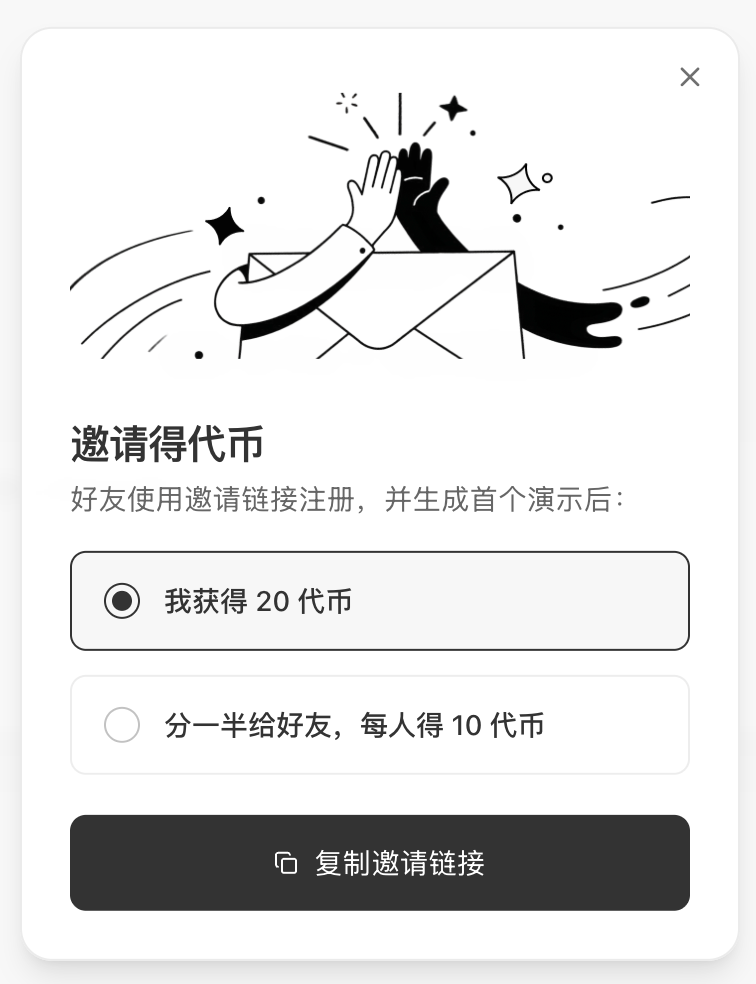
How to invite
- Open Invite friends from Home or account menu
- Choose reward mode (keep all / split)
- Copy your invite link or code
- Share with friends
Friend signup flow
Friends can register from your link:Phone signup
- Open the invite link
- Enter phone and verification code
- Registration binds the invite automatically
Email signup
- Open the link and choose Email login
- Enter email and verification code
- Auto login after signup — phone binding optional
Email signup suits users without a mainland China phone number. You can add a phone later in account settings.
Third-party login
WeChat and other OAuth signups still bind the invite when the user enters via your link.Reward payout
- Track progress and invitees in the invite panel
- Approved inviter rewards appear under gifted Compute Credits in balance
FAQ
Can I switch reward modes anytime?
Can I switch reward modes anytime?
Yes. The two modes have separate invitation links and both can remain in use; choose the reward mode you want each time you share and copy its corresponding link.
I did not receive a reward after my friend signed up?
I did not receive a reward after my friend signed up?
Inviter rewards are reviewed about 24 hours after the friend registers and are not issued immediately. Make sure the friend has created their first demo and that both the inviter and invitee have added the official WeCom contact. You can also check progress in the invite panel.
Invite code vs invite link?
Invite code vs invite link?
Same effect. Codes are easy to say aloud; links are easy to share online.
Do team invites conflict with Compute Credit invites?
Do team invites conflict with Compute Credit invites?
No. Team invites do not pay invite rewards. Users can register via invite link first, earn rewards, then join a team workspace. The flows are independent.