

Pricing
superun uses a simple Compute Credit pricing model. When you need more balance, buy Compute Credit packs on demand (similar to a mobile data add-on—easy to understand). All Compute Credits are valid for 12 months; when you spend them, the system automatically deducts the oldest balance first.Top up Compute Credit packs
Buy Compute Credit packs based on what you need (similar to a mobile data add-on—easy to understand). All Compute Credits are valid for 12 months; when you spend them, the system automatically deducts the oldest balance first. Open Account → My Compute Credits, go to the Price list tab, and choose a top-up tier (on the same page you can switch to Usage details and Project details).
200 Compute Credits — ¥299
- Good for small apps
- About 1.50 元 per Compute Credit
800 Compute Credits — ¥799
- Good for medium-sized apps
- About 1.00 元 per Compute Credit
2,000 Compute Credits — ¥1,799
- Good for large apps
- About 0.89 元 per Compute Credit
Custom top-up
- As low as 0.88 元 per Compute Credit
The top-up page also offers Gift cards and WeChat support in the upper-right corner: gift cards let you buy Compute Credits for someone else (see Billing announcements); scan the QR code to reach WeChat support if you have questions.
Team top-up plans
The team top-up entry shows purchasable Compute Credit packs. You can pick a fixed amount or enter a custom amount and click Pay now. Supported team top-up tiers today:- 4,800 元: about 0.88 元 per Compute Credit
- 9,800 元: about 0.85 元 per Compute Credit
- 50,000 元: about 0.80 元 per Compute Credit
- Custom amount: calculated per the rules shown on the page

New user bonus: Registration grants 40 Compute Credits (valid 1 month) plus 10 Compute Credits on first login (valid 1 day), 50 Compute Credits total—the 10 from first login expire the next day.Daily login: Log in each day to receive 10 Compute Credits automatically, up to 40 Compute Credits per month (no manual check-in). Daily login Compute Credits are valid for 1 day. If your balance shows a non-integer (e.g. 9.88), you may have prior debt—check Account → My Compute Credits → Usage details.
Top-up benefits
After a paid top-up, you get:- Instant credit: Compute Credits take effect immediately
- Remove the superun badge: Paid top-ups let you remove the superun mark from projects. The badge sits at the bottom of the page by default and can cover bottom navigation or action buttons. Any paid top-up removes it permanently so layout is no longer affected.
- 12-month validity: Purchased Compute Credits are valid for 12 months from the date acquired; spending always uses the oldest balance first
Compute Credit billing details
On Account, you can review detailed Compute Credit usage:Usage details
The Usage details section shows full Compute Credit activity, including:- Transactions: All Compute Credit transactions with timestamps
- Usage breakdown: Compute Credits spent by feature (including add-ons such as superun Cloud, superun AI, Stripe, superun image generation, and more)
- Balance history: How your Compute Credit balance changes over time

Project details
The Project details section shows Compute Credit usage per project:- Per-project totals: Total Compute Credits consumed by each project
- Cost breakdown: Project storage fee, Compute Credit usage, and cloud service fees listed separately
- Optimization hints: Compare projects to spot high-usage ones quickly
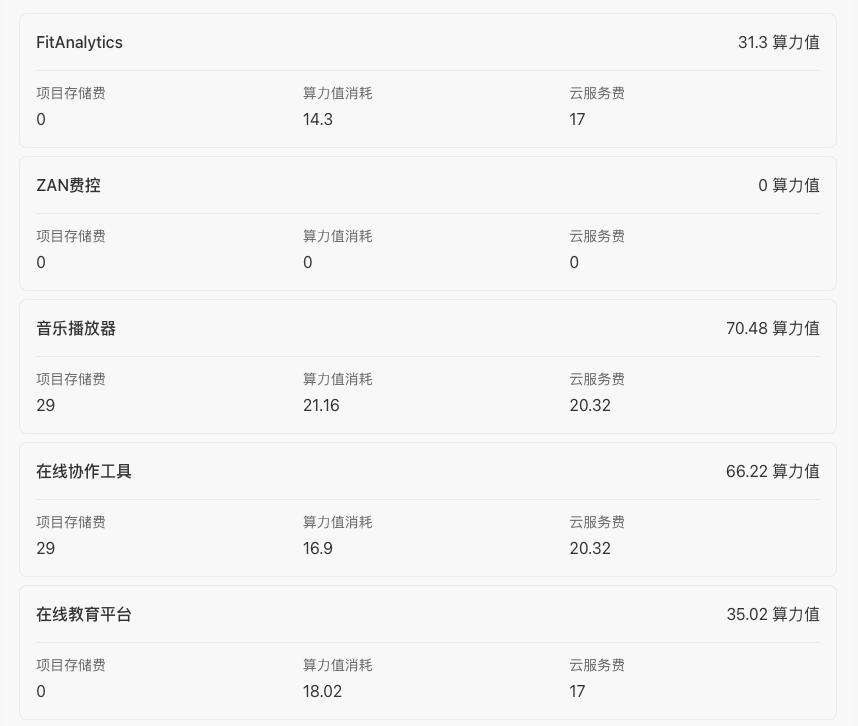 Filter and search Usage details and Project details to understand patterns and optimize Compute Credit spend.
Invoices
Request invoices under Personal center → Orders: open the matching order and click to invoice. Two ways to open Personal center Option 1 · From the home page: click your username in the upper-right to open the menu, then User profile at the top to enter Personal center. Option 2 · From a project page: click the project name in the upper-left to open the menu, then User profile at the top to enter Personal center.
 How to invoice
- In Personal center, open the Orders tab.

- You land on Orders & invoices—find the order and request an invoice.

You can also open the same Orders & invoices page from My Compute Credits → Order history.
How Compute Credits work
superun uses Compute Credits as one unit across features. There is no separate AI bill—usage is deducted from each project’s Compute Credit balance. Compute Credits may be used for:- AI chat and automation flows
- Generating or regenerating UI and design concepts. In the standard concept flow, Concept A is free and each user gets one free first designer commission across projects. Later commissions are estimated at 50–100 Compute Credits and charged by actual usage after completion; the estimate is not a fixed fee or cap. Starting a paid commission requires the actual payer to have more than 100 credits. Demo generation after selection, edits, and development are billed separately. See Design concepts.
- Some higher-resource actions (clearly labeled in the UI)
- Add-ons and integrations (e.g. superun Cloud, superun AI, Stripe, superun image generation)—their cost is converted to Compute Credits and deducted from the project balance.
Avoid unexpected charges
Some heavy operations are labeled in the UI, but not every action shows an estimate. These habits help:- Consult first: Use free Consultation mode to discuss the plan with AI, then execute once the approach is clear. Consultation does not consume Compute Credits.
- Troubleshoot bugs first: Troubleshoot is free and fixes many obvious issues—don’t ask AI to retry blindly.
- Review usage afterward: Account → My Compute Credits → Usage details → Project details shows per-project Compute Credits and cost breakdown.
- Stop looping fixes: If the same issue isn’t improving after several attempts, pause, use Consultation mode to rethink, then try a different approach.
💡 Tip: Consultation, Troubleshoot, and manual editing do not consume Compute Credits—prefer them while planning and fixing.
Fee structure
superun charges fall into three categories:
All fees are deducted from your Compute Credit balance automatically. See Account → My Compute Credits → Usage details for line items.
1. Creation storage fee
Covers keeping the project editable and stored. Each project has its own billing cycle (~one month; alignment with calendar months follows the product).- Amount: 29 Compute Credits per billing cycle.
- First cycle free: After the project is created and concept generation finishes, the first billing cycle has no creation storage fee.
- Unpublished projects: While not published, there is no tally of “published calendar days”; creation storage still follows first-cycle free and compute refund rules; “≥20 published calendar days waives this cycle” applies only to published projects.
- Waivers (two parallel paths—either one applies): In the same billing cycle, both rules are active; meeting either waives 29 Compute Credits creation storage for that cycle per product rules (refunds, waivers, and UI copy follow the product):
- Compute refund: Cycle compute usage ≥ 30 Compute Credits → creation storage fee refunded automatically.
- Published-day tally (published only): While published, count calendar days on which the project was published at any time; ≥ 20 days in the cycle → waive the 29 Compute Credits for that cycle; otherwise it still applies. Offline days don’t count; the running tally does not reset mid-cycle.
- Arrears: After debt exceeds the 50 Compute Credit overdraft, the project is archived (deleted).
💡 Compute usage and cloud service fees still bill on actual usage and aren’t affected by the published-day rule. Active projects often hit compute ≥30 or 20 published days, so the 29 Compute Credit creation storage fee for the cycle may be 0 (confirm on your bill).
2. Compute usage fee
Charged by actual usage when AI runs features, including:- AI chat: Charged by conversation length and complexity when AI builds or edits
- superun AI: Charged by tokens used
- superun image generation: Charged by image size and complexity
💡 Consultation mode and Troubleshoot are completely free and do not consume Compute Credits. Prefer Consultation while planning and Troubleshoot when something breaks.Compute usage is deducted in real time. See each call under Account → My Compute Credits → Usage details.
3. Cloud service fees
Billing starts after the project is published and live, and includes:Cloud services are billed as fixed + usage. Once live, cloud compute and storage stay resident for your app, so there is a base charge even on days with no visitors; traffic only affects the usage portion. Archive a project you aren’t using to pause the related billing.To prepay cloud service fees for one project, see Cloud service credit pack. Those credits pay only that project’s cloud service fees.
3.1 superun Cloud
handles every “action” in your app—sign-in, queries, submissions—each backed by cloud compute. Think of it as an always-on worker paid for actual work; cost scales with usage.💡 Reference: A low-DAU small app (few logins, occasional backend logic) might use about 3.5 Compute Credits/day, ~105 Compute Credits/month.
3.2 Cloud storage
① Cloud storage (enabled automatically for published projects) Stores all app data so users can read it anytime. Like renting a warehouse that stays open—more storage and more reads/writes cost more.💡 Reference: A small app with few users and occasional visits might use about 1 Compute Credit/day.② File storage (enable manually in project settings) Stores user uploads such as images and documents. When enabled:
Scaling
For campaigns, traffic spikes, or other high-concurrency cases, contact us for manual scaling; fees increase accordingly during scaling. WeCom support (scan to add):
Combined cost example
Example daily and monthly estimates for a small published app: Assumptions: ~2 AI chats/day (~2 Compute Credits/day), 2 GB storage, 5 million writes/month and 50 million reads/month.💡 In this example, ~60 Compute Credits of compute usage exceeds 30, so creation storage (29 Compute Credits) is 0 via compute refund. With lower compute but published and ≥20 published calendar days in the cycle, published-day waiver may also apply. Unpublished projects don’t use the published-day path and follow creation storage rules only. Actual costs depend on scale and enabled features; numbers above are illustrative. Very low-DAU published small projects often start around 135 Compute Credits/month (cloud ~105 + storage ~30). Unpublished projects incur no cloud service fees—only compute and creation storage apply.
Insufficient Compute Credits
When balance runs low, cloud services may shut down automatically to protect your data:Before shutdown
- Overdraft: 50 Compute Credits overdraft lets you keep going briefly when balance is insufficient
- Reminders: SMS and other channels remind you to top up
After shutdown
If cloud services stopped due to low balance:- Top up: Account → My Compute Credits
- Auto-restore: Services usually resume after top-up
- Manual restore if needed:
- Click Troubleshoot for automatic repair
- In Launch → Publish, click Update to republish
⚠️ Important:
- If balance (including overdraft) is fully exhausted after shutdown, project data may no longer be retained
- To recover data from a shut-down project, add WeCom support and pay the data recovery fee
- Check balance regularly to avoid unexpected shutdown and data loss
Invite friends for Compute Credits
Invite friends to superun and earn 20 Compute Credits:- Get your link: Find your invite link in account settings or on the home page.
- Share: Send the link to friends who want to try superun.
- Friend registers: They sign up through your link.
- Friend completes a demo: They must:
- Enter a requirement in superun
- Generate free Concept A; optionally commission another concept
- Pick a concept and finish the demo app
- Earn 20 Compute Credits: Credits are added when the demo is complete.


Refund policy
Compute Credits are a virtual service; purchases are generally non-refundable. For questions about past top-up orders or the Credits → Compute Credits conversion, contact support.⚠️ Important: Compute Credits are valid 12 months; spending uses the oldest balance first. Buy only what you need and plan usage accordingly.
Compute Credit validity
- Paid Compute Credits are valid 12 months from the date acquired; spending uses the oldest balance first.
- Registration and login bonuses:
- 40 Compute Credits from registration, valid 1 month
- 10 Compute Credits per daily login, valid 1 day
- Compute Credits from promos, invites, and other non-paid sources follow the terms at grant time.
- If your account has no activity for 12 consecutive months, we notify you in advance through multiple channels; existing balance is not cleared while the account still holds credits.
Manage your Compute Credits
- Top up anytime in the product and pick a plan that fits.
- Top up whenever you want—no setup fee; payments use secure processing.
- 12-month validity: Purchased Compute Credits last 12 months from acquisition; oldest balance is spent first.
More help: Help center.