1. Overview

This solution is based on the Feishu OAuth 2.0 authorization code flow. It embeds a QR code scan area in the webpage using the official Feishu QR SDK. After the user scans the code, the backend Edge Function handles token exchange and identity verification, achieving access control where only employees of specific enterprises can log in.

2. Feishu Configuration (5 Steps)

Step 1: Create an App and Obtain Credentials

  1. Open the Feishu Open Platform, log in, and go to the Developer Console
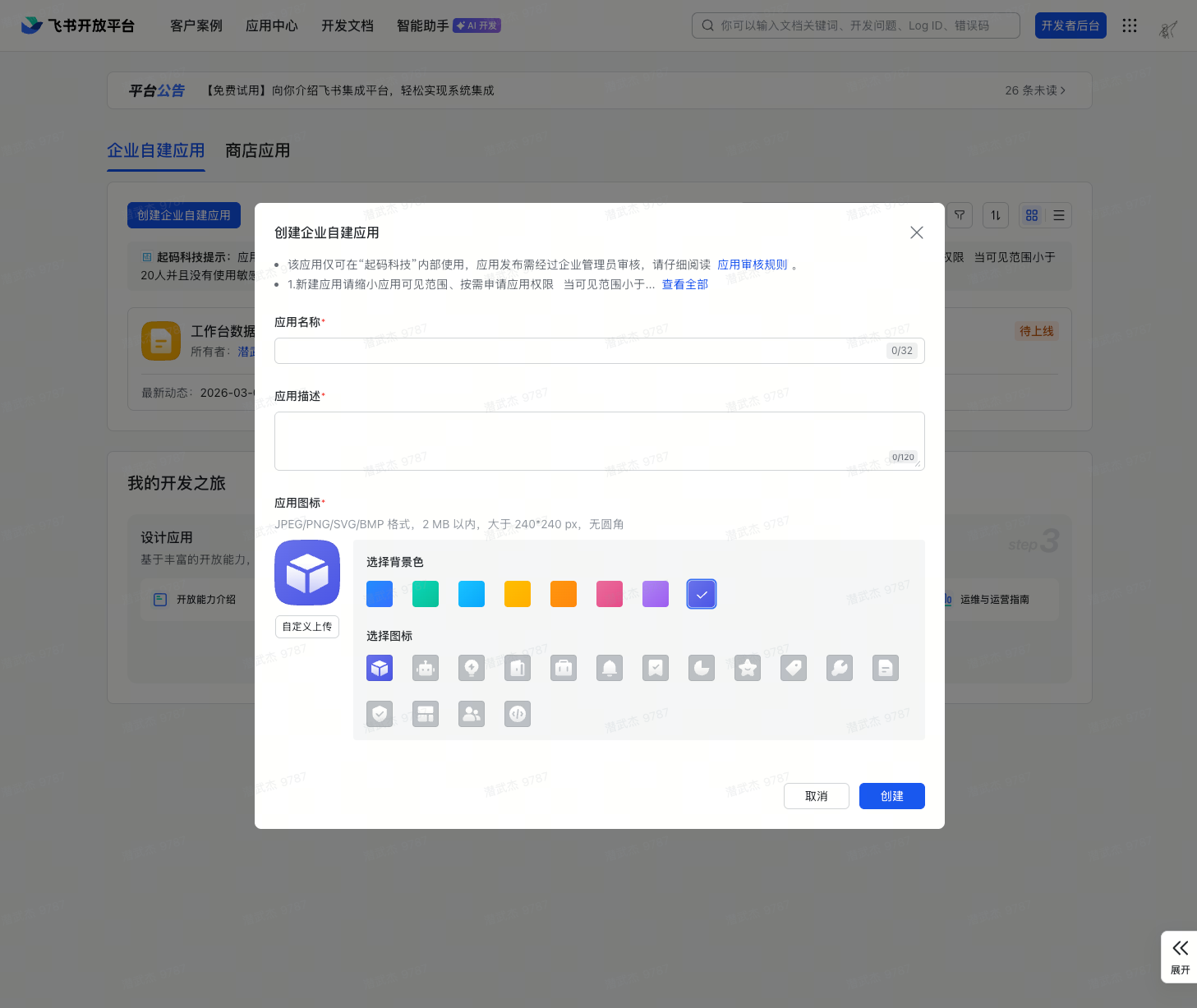
  2. Click Create Enterprise Internal App Create Enterprise Internal App
  3. Fill in the app name (e.g., “Data Workbench”) and description, then click Create
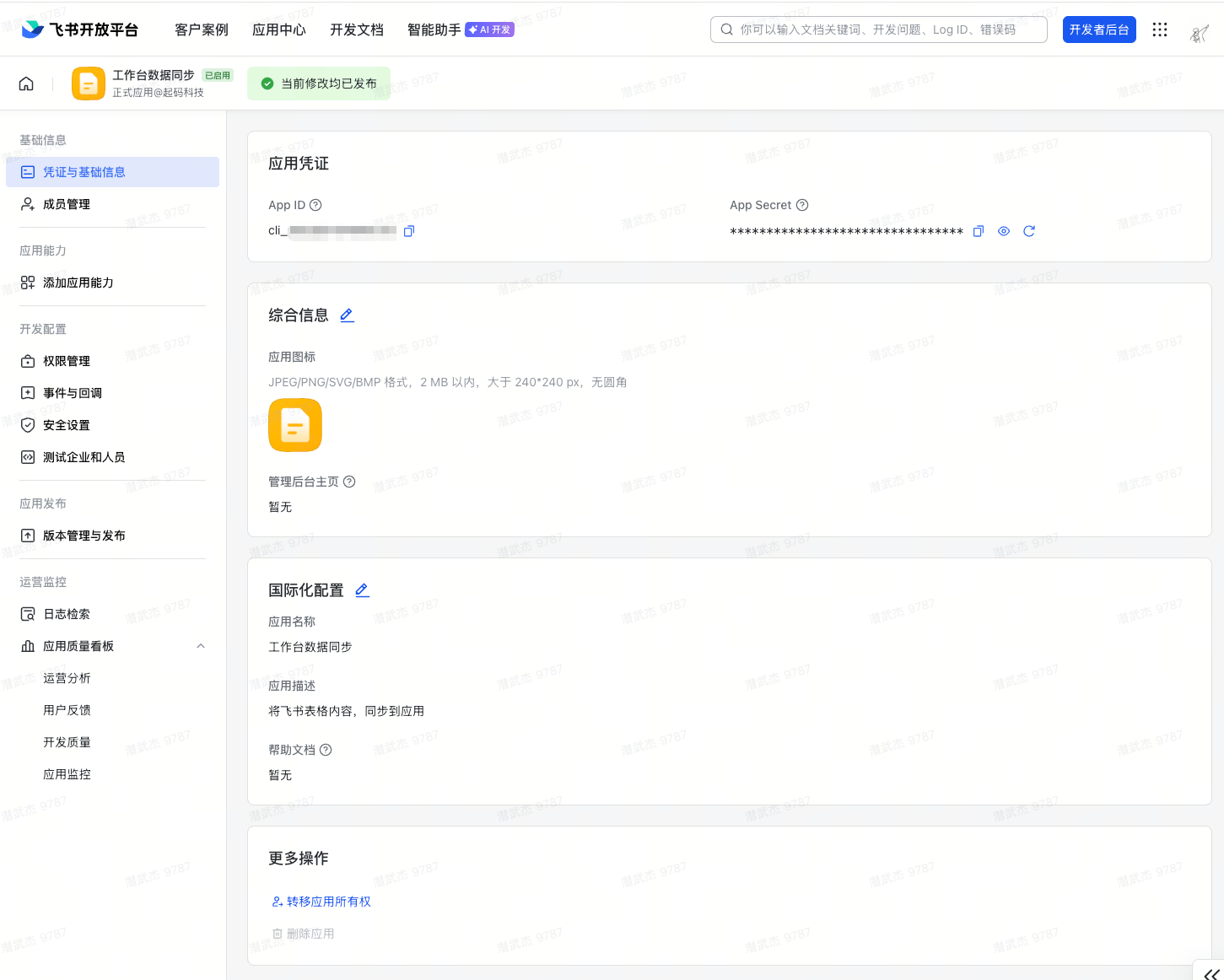
  4. After creation, go to the app details page and select Credentials & Basic Info from the left menu
  5. Record the App ID and App Secret — they correspond to the environment variables SUPERUN_FEISHU_APP_ID and SUPERUN_FEISHU_APP_SECRET respectively Get App Credentials

Step 2: Add Web App Capability

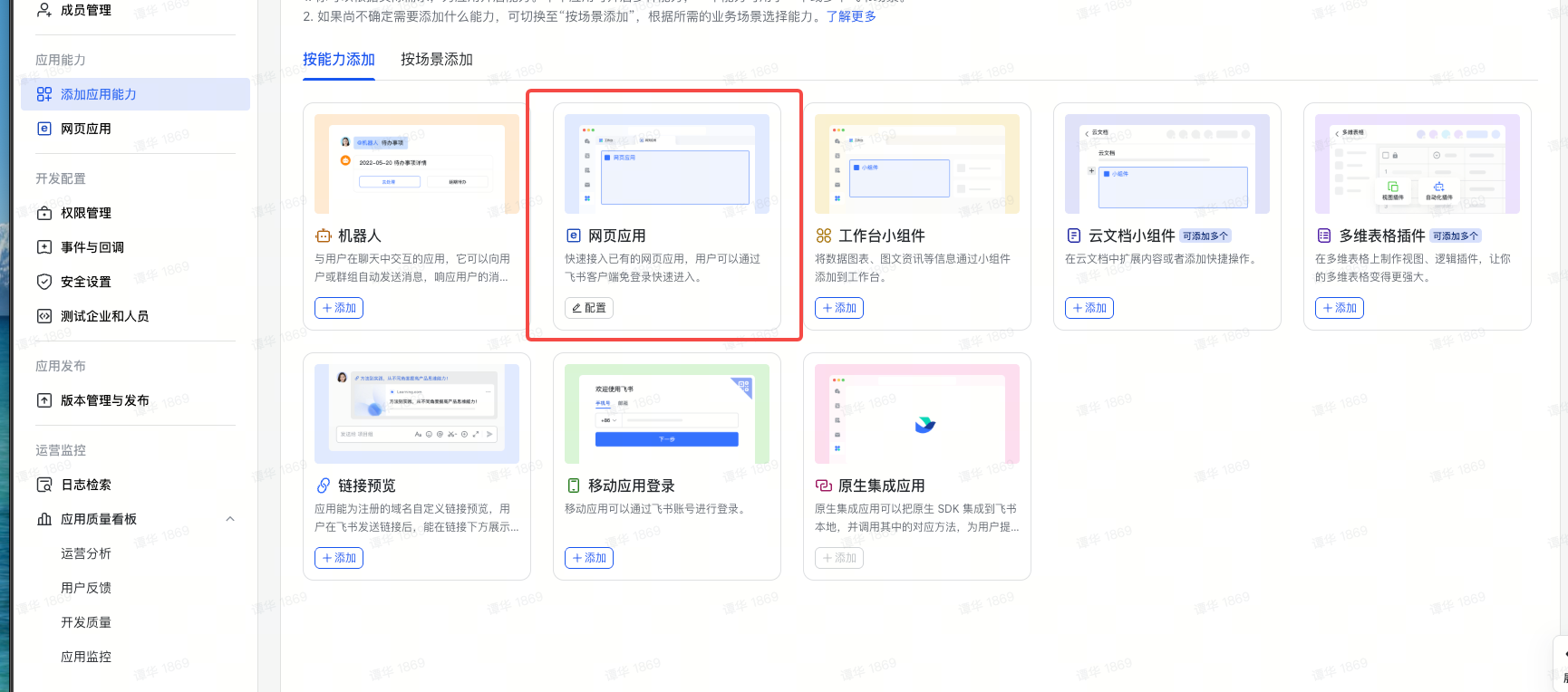
  1. On the app details page, click Add App Capability and select Web App
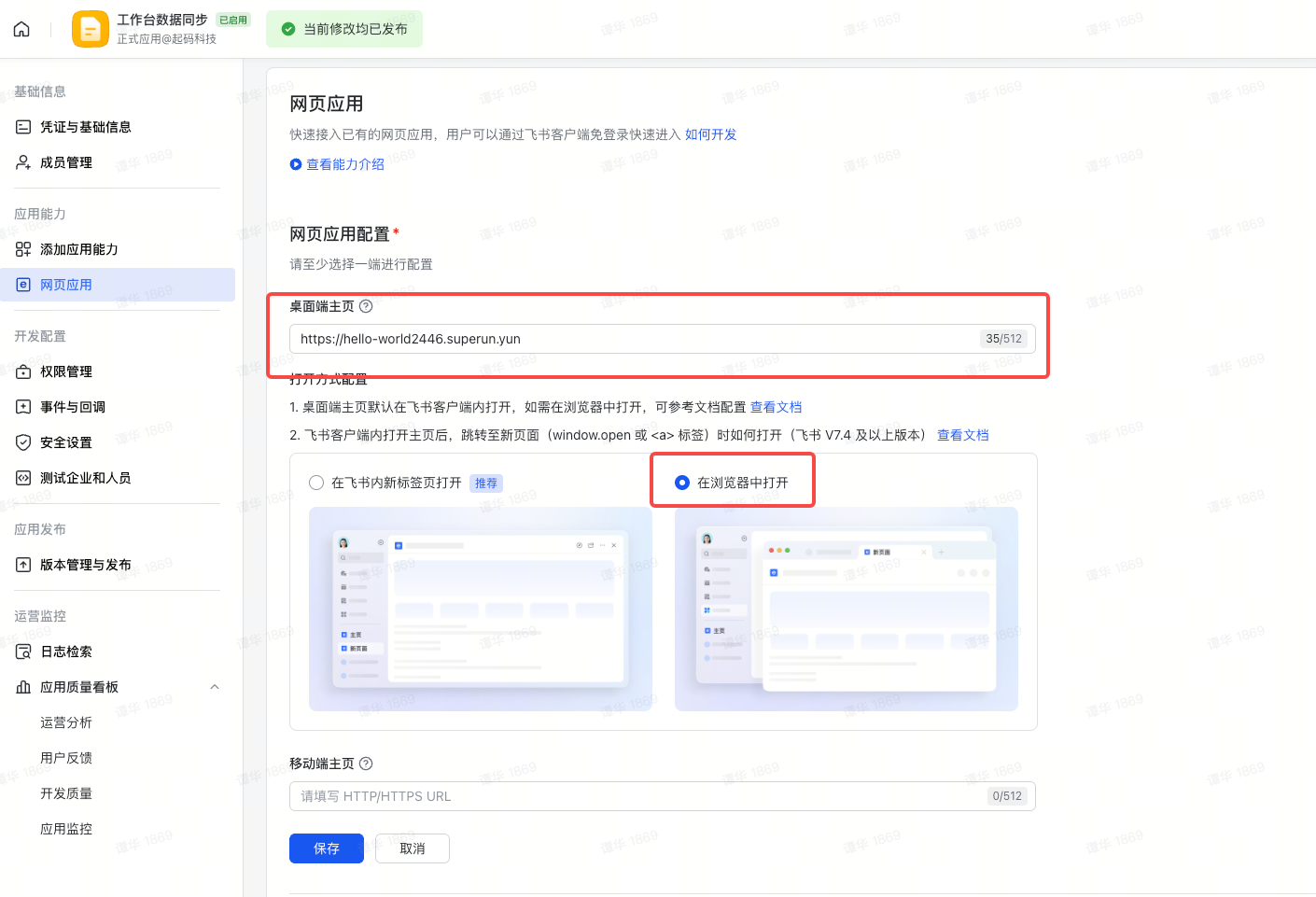
  2. Fill in the desktop homepage URL with the superun published address, and choose to open in browser Add Web App Web App Configuration

Step 3: Configure App Permissions

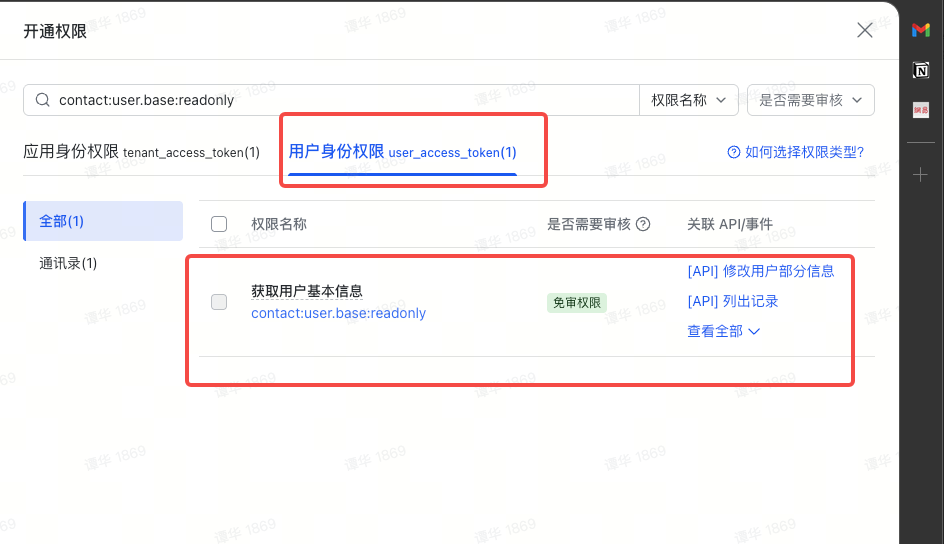
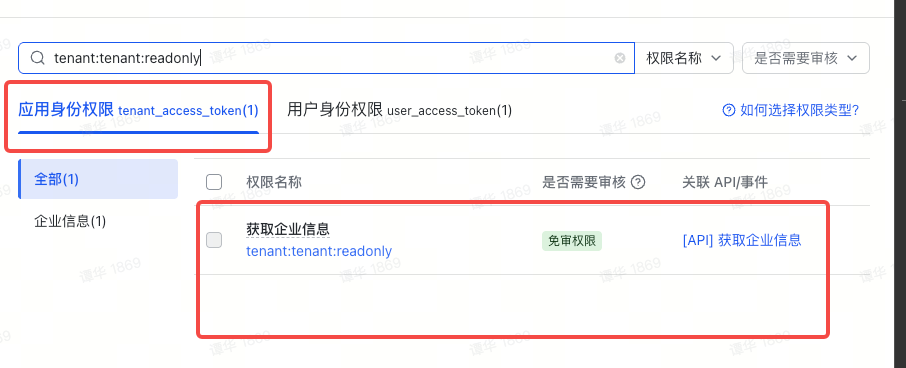
  1. Go to Permission Management, search for and enable the following permissions:
PermissionDescriptionRequiredCategory
contact:user.base:readonlyRead user informationYesUser Identity
tenant:tenant:readonlyGet enterprise informationOnly for whitelist validationApp Identity
Configure App Permissions Configure App Permissions

Step 4: Configure Security Settings (Trusted Domains & Redirect URLs)

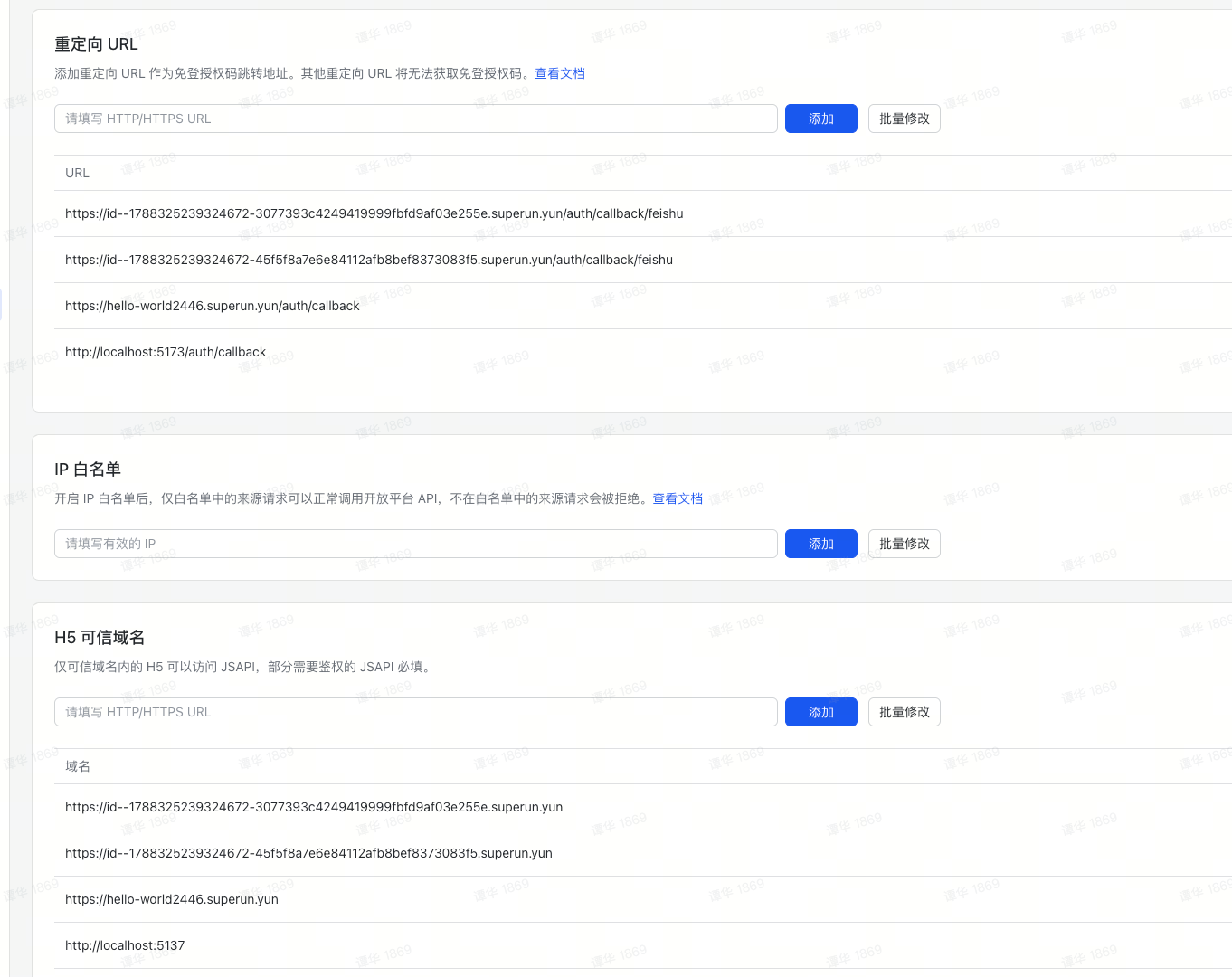
  1. Go to Security Settings
  2. Add H5 Trusted Domains — you need to fill in two domains:
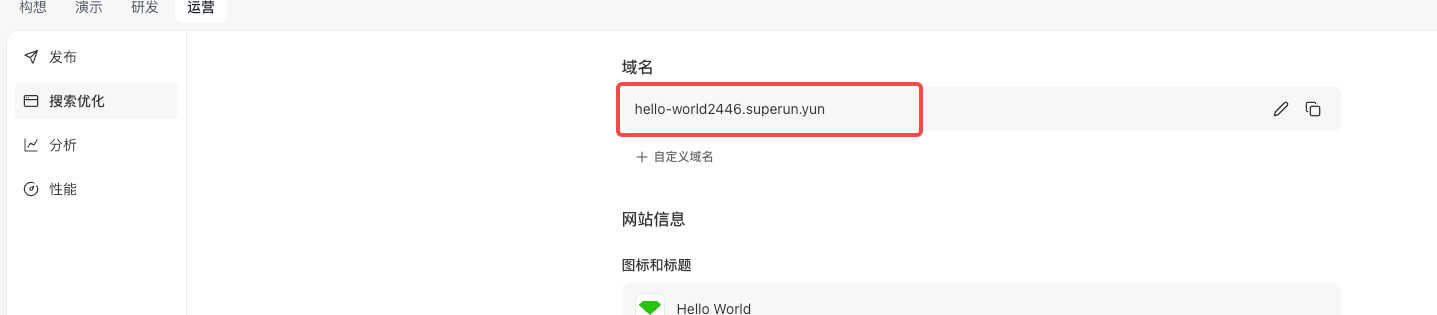
    • The development domain (obtained by clicking Demo / Open New Window Preview, then removing the path)
    • The official domain after publishing
  3. Add Redirect URLs — append the callback page path to the domain, for example:
    • Domain: https://hello-world2446.superun.yun, callback path: /auth/callback/feishu
    • Redirect URL: https://hello-world2446.superun.yun/auth/callback/feishu
    Security Settings Get superun Development Domain Get superun Published Domain

Step 5: Create a Version and Publish

  1. Left menu → Version Management & Release
  2. Create a version → fill in the version number and release notes
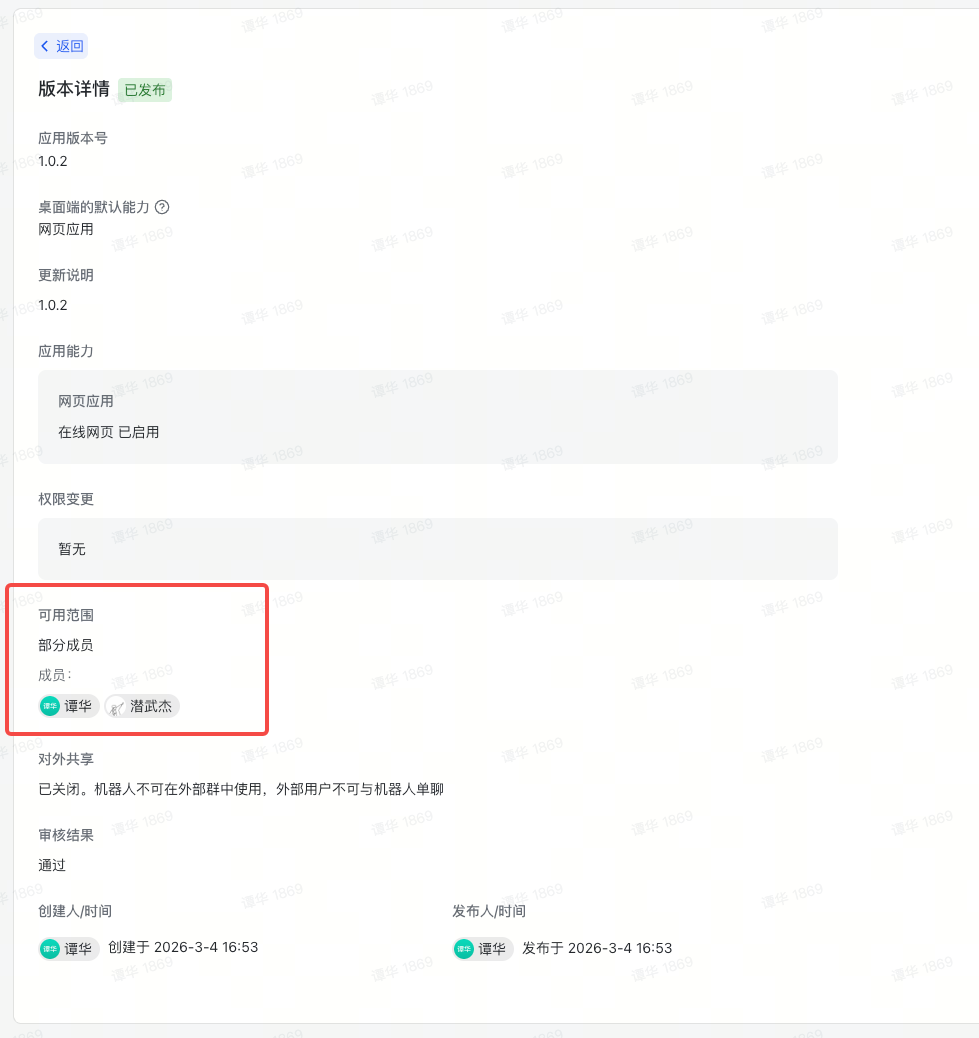
  3. Select the available scope — all employees or specific members (this controls which users can log in via QR code)
  4. Submit for release (enterprise internal apps usually pass review automatically) Set Version Availability Scope
💡 Tip: After enabling permissions, you must create a version and publish it for the permissions to take effect.

3. Data Flow

User opens /login


Frontend loads Feishu QR SDK (dynamically injected via script tag)


Frontend generates CSRF state and stores in sessionStorage


Calls Edge Function feishu-qr-url (passing redirect_uri + state)
→ Backend constructs goto URL using FEISHU_APP_ID and returns it to frontend


Calls window.QRLogin({ goto: gotoUrl }) to render QR code


User scans QR code with Feishu App and confirms


SDK returns tmp_code via postMessage


Frontend redirects to goto + &tmp_code=xxx


Feishu server verifies and 302 redirects to redirect_uri?code=xxx&state=xxx


/auth/callback/feishu page extracts code and validates state


Frontend calls Edge Function feishu-auth, passing code and redirect_uri


Edge Function internally:
  ① POST /authen/v2/oauth/token → exchange code for user_access_token
  ② GET  /authen/v1/user_info   → get user info (including tenant_key)
  ③ (Optional) Validate tenant_key against whitelist
  ④ Find/create Supabase user + user_identities record
  ⑤ Generate magiclink token_hash and return to frontend


Frontend calls supabase.auth.verifyOtp({ token_hash, type: 'magiclink' })


Supabase session established, redirect to protected page

4. Environment Variables

  1. plugin_secret_prefix should be SUPERUN
VariableLocationDescription
FEISHU_APP_IDEdge Function SecretsFeishu App ID, used to construct QR code URL and token exchange
FEISHU_APP_SECRETEdge Function SecretsFeishu App Secret, used only on the backend
ALLOWED_TENANT_KEYSEdge Function Secrets(Optional) Allowed enterprise tenant_keys, comma-separated; leave empty to skip whitelist validation and allow all enterprises

5. Key Code

5.1 Feishu QR SDK Loading Hook

The Feishu QR SDK can only be imported via a script tag. This Hook encapsulates script loading, fetching the authorization URL via Edge Function, QR code initialization, and scan event listening. Key change: appId is no longer passed from the frontend — instead, the full goto URL is constructed on the backend via the feishu-qr-url Edge Function. The frontend only provides redirectUri and state.
// hooks/useFeishuQRCode.ts
import { supabase } from "@/integrations/supabase/client";
const FEISHU_SDK_URL =
  "https://lf-package-cn.feishucdn.com/obj/feishu-static/lark/passport/qrcode/LarkSSOSDKWebQRCode-1.0.3.js";
interface UseFeishuQRCodeOptions {
  containerId: string;   // DOM id of the QR code render container
  redirectUri: string;    // OAuth callback URL
  width?: string;
  height?: string;
  style?: string;
}
export function useFeishuQRCode({
  containerId, redirectUri,
  width = "300", height = "300", style,
}: UseFeishuQRCodeOptions) {
  const [status, setStatus] = useState<"loading" | "ready" | "scanned" | "error">("loading");
  const [errorMessage, setErrorMessage] = useState<string | null>(null);
  const qrLoginRef = useRef(null);
  const gotoUrlRef = useRef("");
  // Generate random state and store in sessionStorage to prevent CSRF
  const generateState = useCallback(() => {
    const randomState = crypto.randomUUID();
    sessionStorage.setItem("feishu_oauth_state", randomState);
    return randomState;
  }, []);
  useEffect(() => {
    let isCleanedUp = false;
    const loadSdkAndInit = async () => {
      // 1. Dynamically inject SDK script
      if (!window.QRLogin) {
        await new Promise<void>((resolve, reject) => {
          const script = document.createElement("script");
          script.src = FEISHU_SDK_URL;
          script.async = true;
          script.onload = () => resolve();
          script.onerror = () => reject(new Error("Failed to load Feishu SDK"));
          document.head.appendChild(script);
        });
      }
      if (isCleanedUp) return;
      // 2. Generate CSRF state, call Edge Function to get goto URL
      const state = generateState();
      const { data, error } = await supabase.functions.invoke("feishu-qr-url", {
        body: { redirect_uri: redirectUri, state },
      });
      if (isCleanedUp) return;
      if (error || !data?.goto_url) {
        setStatus("error");
        setErrorMessage("Failed to get login URL");
        return;
      }
      const gotoUrl = data.goto_url;
      gotoUrlRef.current = gotoUrl;
      // 3. Render QR code
      const qrLoginInstance = window.QRLogin({
        id: containerId,
        goto: gotoUrl,
        width, height,
      });
      qrLoginRef.current = qrLoginInstance;
      setStatus("ready");
      // 4. Listen for scan events
      const handleMessage = (event: MessageEvent) => {
        if (
          qrLoginInstance.matchOrigin(event.origin) &&
          qrLoginInstance.matchData(event.data)
        ) {
          setStatus("scanned");
          const tmpCode = event.data.tmp_code;
          // Redirect to Feishu auth page; Feishu will 302 to redirect_uri after verification
          window.location.href = `${gotoUrl}&tmp_code=${tmpCode}`;
        }
      };
      window.addEventListener("message", handleMessage);
      return () => window.removeEventListener("message", handleMessage);
    };
    loadSdkAndInit().catch((err) => {
      if (!isCleanedUp) {
        setStatus("error");
        setErrorMessage(err.message);
      }
    });
    return () => { isCleanedUp = true; };
  }, [redirectUri, containerId, width, height, style, generateState]);
  return { status, errorMessage };
}
Key points:
  • appId does not appear on the frontend — the full URL is constructed on the backend via the feishu-qr-url Edge Function
  • state is still generated on the frontend and stored in sessionStorage, then deleted after comparison on the callback page
  • matchOrigin + matchData double validation ensures the message source is legitimate
  • If the Edge Function call fails, the Hook enters the error state and displays a prompt

5.2 OAuth Callback Page

After Feishu’s 302 redirect, the callback page extracts code, validates state, and calls the backend to exchange for user information:
// pages/AuthCallback.tsx
export default function AuthCallback() {
  const [searchParams] = useSearchParams();
  const navigate = useNavigate();
  const hasProcessed = useRef(false); // Prevent double execution in StrictMode
  useEffect(() => {
    if (hasProcessed.current) return;
    hasProcessed.current = true;
    const processCallback = async () => {
      const code = searchParams.get("code");
      const returnedState = searchParams.get("state");
      // 1. Validate state (CSRF protection)
      const storedState = sessionStorage.getItem("feishu_oauth_state");
      if (!returnedState || returnedState !== storedState) {
        // Security check failed, abort
        return;
      }
      sessionStorage.removeItem("feishu_oauth_state");
      if (!code) return; // Authorization code missing
      // 2. Call backend Edge Function
      const redirectUri = `${window.location.origin}/auth/callback/feishu`;
      const { data, error } = await supabase.functions.invoke("feishu-auth", {
        body: { code, redirect_uri: redirectUri },
      });
      // 3. Handle result
      if (data?.error === "access_denied") {
        // Enterprise not in whitelist
        return;
      }
      if (data?.user) {
        // Login successful, save user info and redirect
        navigate("/", { replace: true });
      }
    };
    processCallback();
  }, [searchParams, navigate]);
}
Key points:
  • useRef(hasProcessed) is essential — React StrictMode executes useEffect twice; the first run clears sessionStorage state, so the second run would fail validation
  • redirect_uri must exactly match the one passed in the login page goto

5.3 Edge Function: feishu-qr-url (Generate QR Code Authorization URL)

The frontend no longer holds FEISHU_APP_ID. This lightweight Edge Function constructs the full goto URL on the backend:
// supabase/functions/feishu-qr-url/index.ts
serve(async (req) => {
  const appId = Deno.env.get("SUPERUN_FEISHU_APP_ID");
  if (!appId) {
    return new Response(
      JSON.stringify({ error: "FEISHU_APP_ID not configured" }),
      { status: 500 }
    );
  }
  const { redirect_uri, state } = await req.json();
  if (!redirect_uri || !state) {
    return new Response(
      JSON.stringify({ error: "redirect_uri and state are required" }),
      { status: 400 }
    );
  }
  const gotoUrl =
    `https://passport.feishu.cn/suite/passport/oauth/authorize` +
    `?client_id=${appId}` +
    `&redirect_uri=${encodeURIComponent(redirect_uri)}` +
    `&response_type=code` +
    `&state=${state}`;
  return new Response(JSON.stringify({ goto_url: gotoUrl }), { status: 200 });
});
Configuration:
[functions.feishu-qr-url]
verify_jwt = false

5.4 Edge Function: feishu-auth (Core Backend)

// supabase/functions/feishu-auth/index.ts
serve(async (req) => {
  if (req.method === "OPTIONS") {
    return new Response("ok", { headers: corsHeaders });
  }
  const feishuAppId = Deno.env.get("SUPERUN_FEISHU_APP_ID");
  const feishuAppSecret = Deno.env.get("SUPERUN_FEISHU_APP_SECRET");
  const allowedTenantKeys = Deno.env.get("SUPERUN_FEISHU_ALLOWED_TENANT_KEYS") || "";
  const supabaseUrl = Deno.env.get("SUPABASE_URL")!;
  const supabaseServiceRoleKey = Deno.env.get("SUPABASE_SERVICE_ROLE_KEY")!;
  if (!feishuAppId || !feishuAppSecret) {
    logStep("ERROR", { message: "Missing FEISHU_APP_ID or FEISHU_APP_SECRET" });
    return new Response(
      JSON.stringify({ error: "Server configuration error" }),
      { headers: { ...corsHeaders, "Content-Type": "application/json" }, status: 500 }
    );
  }
  // Supabase Admin client (bypasses RLS)
  const supabaseAdmin = createClient(supabaseUrl, supabaseServiceRoleKey, {
    auth: { autoRefreshToken: false, persistSession: false },
  });
  const { code, redirect_uri } = await req.json();
  if (!code) {
    return new Response(
      JSON.stringify({ error: "Authorization code is required" }),
      { headers: { ...corsHeaders, "Content-Type": "application/json" }, status: 400 }
    );
  }
  // ── Step 1: Exchange code for user_access_token (Feishu v2 API) ──
  logStep("Step 1: Exchanging code for user_access_token");
  const tokenResponse = await fetch(
    "https://open.feishu.cn/open-apis/authen/v2/oauth/token",
    {
      method: "POST",
      headers: { "Content-Type": "application/json; charset=utf-8" },
      body: JSON.stringify({
        grant_type: "authorization_code",
        client_id: feishuAppId,
        client_secret: feishuAppSecret,
        code,
        redirect_uri,
      }),
    }
  );
  const tokenData = await tokenResponse.json();
  if (tokenData.code !== 0 || !tokenData.access_token) {
    logStep("ERROR: Token exchange failed", {
      code: tokenData.code,
      error: tokenData.error,
      description: tokenData.error_description,
    });
    return new Response(
      JSON.stringify({
        error: "Token exchange failed",
        detail: tokenData.error_description || tokenData.error || "Unknown error",
      }),
      { headers: { ...corsHeaders, "Content-Type": "application/json" }, status: 401 }
    );
  }
  logStep("Step 1 completed", { expires_in: tokenData.expires_in });
  // ── Step 2: Get user info from Feishu ──
  logStep("Step 2: Fetching user info");
  const userInfoResponse = await fetch(
    "https://open.feishu.cn/open-apis/authen/v1/user_info",
    {
      method: "GET",
      headers: {
        Authorization: `Bearer ${tokenData.access_token}`,
        "Content-Type": "application/json; charset=utf-8",
      },
    }
  );
  const userInfoData = await userInfoResponse.json();
  if (userInfoData.code !== 0) {
    logStep("ERROR: Failed to fetch user info", { code: userInfoData.code, msg: userInfoData.msg });
    return new Response(
      JSON.stringify({ error: "Failed to get user info", detail: userInfoData.msg }),
      { headers: { ...corsHeaders, "Content-Type": "application/json" }, status: 401 }
    );
  }
  const feishuUser = userInfoData.data;
  const tenantKey = feishuUser.tenant_key;
  logStep("Step 2 completed", {
    name: feishuUser.name,
    tenant_key: tenantKey,
    open_id: feishuUser.open_id,
  });
  // ── Step 3: Enterprise whitelist validation (optional) ──
  // If SUPERUN_FEISHU_ALLOWED_TENANT_KEYS is not configured or empty, skip whitelist validation
  logStep("Step 3: Validating tenant_key (optional)");
  const allowedList = allowedTenantKeys
    .split(",")
    .map((key: string) => key.trim())
    .filter(Boolean);
  if (allowedList.length > 0 && !allowedList.includes(tenantKey)) {
    logStep("REJECTED: Tenant not in whitelist", {
      tenant_key: tenantKey,
      allowed: allowedList,
    });
    return new Response(
      JSON.stringify({
        error: "access_denied",
        message: "Your enterprise is not authorized to access this application",
        tenant_key: tenantKey,
      }),
      { headers: { ...corsHeaders, "Content-Type": "application/json" }, status: 403 }
    );
  }
  logStep("Step 3 completed: Tenant validated (or whitelist disabled)");
  // Following the general third-party OAuth architecture
  // ── Step 4: Find or create Supabase user via user_identities table ──
  logStep("Step 4: Finding or creating Supabase user");
  const oauthProvider = "feishu";
  const oauthOpenId = feishuUser.open_id;
  // Use a virtual email to avoid conflicts with accounts registered with real emails
  const userEmail = `feishu_${oauthOpenId}@oauth.local`;
  const userMetadata = {
    oauth_provider: oauthProvider,
    oauth_open_id: oauthOpenId,
    name: feishuUser.name,
    en_name: feishuUser.en_name,
    avatar_url: feishuUser.avatar_url,
    tenant_key: tenantKey,
    ...feishuUser,
  };
  // Query user_identities table (service_role bypasses RLS)
  const { data: existingIdentity } = await supabaseAdmin
    .from("user_identities")
    .select("id")
    .eq("oauth_provider", oauthProvider)
    .eq("oauth_open_id", oauthOpenId)
    .single();
  if (existingIdentity) {
    logStep("User exists, updating metadata", { userId: existingIdentity.id });
    // Update auth user metadata
    await supabaseAdmin.auth.admin.updateUserById(existingIdentity.id, {
      user_metadata: userMetadata,
    });
    // Sync user_identities table
    await supabaseAdmin
      .from("user_identities")
      .update({
        raw_metadata: userMetadata,
        updated_at: new Date().toISOString(),
      })
      .eq("id", existingIdentity.id);
  } else {
    logStep("New user, creating Supabase account", { email: userEmail });
    const { error: createError } = await supabaseAdmin.auth.admin.createUser({
      email: userEmail,
      email_confirm: true,
      user_metadata: userMetadata,
    });
    if (createError) {
      logStep("ERROR: Failed to create user", { message: createError.message });
      return new Response(
        JSON.stringify({ error: "Failed to create user account", detail: createError.message }),
        { headers: { ...corsHeaders, "Content-Type": "application/json" }, status: 500 }
      );
    }
    // Trigger automatically creates user_identities row
  }
  // ── Step 5: Generate magic link token for session establishment ──
  logStep("Step 5: Generating magic link token");
  const { data: linkData, error: linkError } = await supabaseAdmin.auth.admin.generateLink({
    type: "magiclink",
    email: userEmail,
  });
  if (linkError || !linkData) {
    logStep("ERROR: Failed to generate link", { message: linkError?.message });
    return new Response(
      JSON.stringify({ error: "Failed to generate session token", detail: linkError?.message }),
      { headers: { ...corsHeaders, "Content-Type": "application/json" }, status: 500 }
    );
  }
  const hashedToken = linkData.properties?.hashed_token;
  if (!hashedToken) {
    logStep("ERROR: No hashed_token in response", { linkData });
    return new Response(
      JSON.stringify({ error: "Failed to generate session token" }),
      { headers: { ...corsHeaders, "Content-Type": "application/json" }, status: 500 }
    );
  }
  logStep("Step 5 completed: Token generated");
  return new Response(
    JSON.stringify({
      token_hash: hashedToken,
      user: feishuUser,
    }),
    {
      headers: { ...corsHeaders, "Content-Type": "application/json" },
      status: 200,
    }
  );
});

Note: JWT verification must be disabled in supabase/config.toml since this endpoint is called before the user is logged in:
[functions.feishu-auth]
verify_jwt = false

5.5 Edge Function: feishu-tenant-info (Get Enterprise tenant_key)

Used to query enterprise information directly using app credentials without requiring the user to scan a QR code — useful for obtaining the tenant_key to configure in the whitelist environment variable:
// supabase/functions/feishu-tenant-info/index.ts
serve(async (req) => {
  const appId = Deno.env.get("FEISHU_APP_ID");
  const appSecret = Deno.env.get("FEISHU_APP_SECRET");
  // Step 1: Get tenant_access_token
  const tokenResponse = await fetch(
    "https://open.feishu.cn/open-apis/auth/v3/tenant_access_token/internal",
    {
      method: "POST",
      headers: { "Content-Type": "application/json; charset=utf-8" },
      body: JSON.stringify({ app_id: appId, app_secret: appSecret }),
    }
  );
  const tokenData = await tokenResponse.json();
  // tokenData.tenant_access_token
  // Step 2: Query enterprise information
  const tenantResponse = await fetch(
    "https://open.feishu.cn/open-apis/tenant/v2/tenant/query",
    {
      method: "GET",
      headers: {
        Authorization: `Bearer ${tokenData.tenant_access_token}`,
        "Content-Type": "application/json; charset=utf-8",
      },
    }
  );
  const tenantData = await tenantResponse.json();
  // tenantData.data.tenant contains name, tenant_key, display_id, etc.
  return new Response(JSON.stringify(tenantData.data));
});

6. Common Pitfalls

IssueCauseSolution
State validation fails (values appear identical)React StrictMode executes useEffect twice; the first run clears sessionStorage, so the second run reads nullUse useRef to ensure the callback is only processed once
redirect_uri mismatchThe goto URL, the token exchange call, and the Feishu console configuration must all be exactly the sameConsistently generate using window.location.origin + '/auth/callback/feishu'
QR code fails to load or no response after scanningThe Feishu QR SDK does not support running inside an iframe (cross-origin restrictions & postMessage origin validation)During testing, click “Open in new window” to preview, or test on a standalone page after deployment