Overview

This guide will help you integrate Feishu multi-dimensional tables in superun to achieve automatic data synchronization and display. Through Edge Functions calling Feishu Open Platform API, multi-dimensional table data is synchronized to Supabase database and displayed in real-time on the frontend.

I. Overall Architecture

Data Flow:
  1. User enters Feishu app credentials + multi-dimensional table link in the frontend
  2. Edge Function calls Feishu API to validate credentials, parse links, and fetch data
  3. Data is written to Supabase database (data_sources / synced_rows / sync_logs)
  4. Frontend reads database in real-time through React Query to display dashboard

II. Feishu Configuration (4 Steps)

Step 1: Create Enterprise Self-built Application

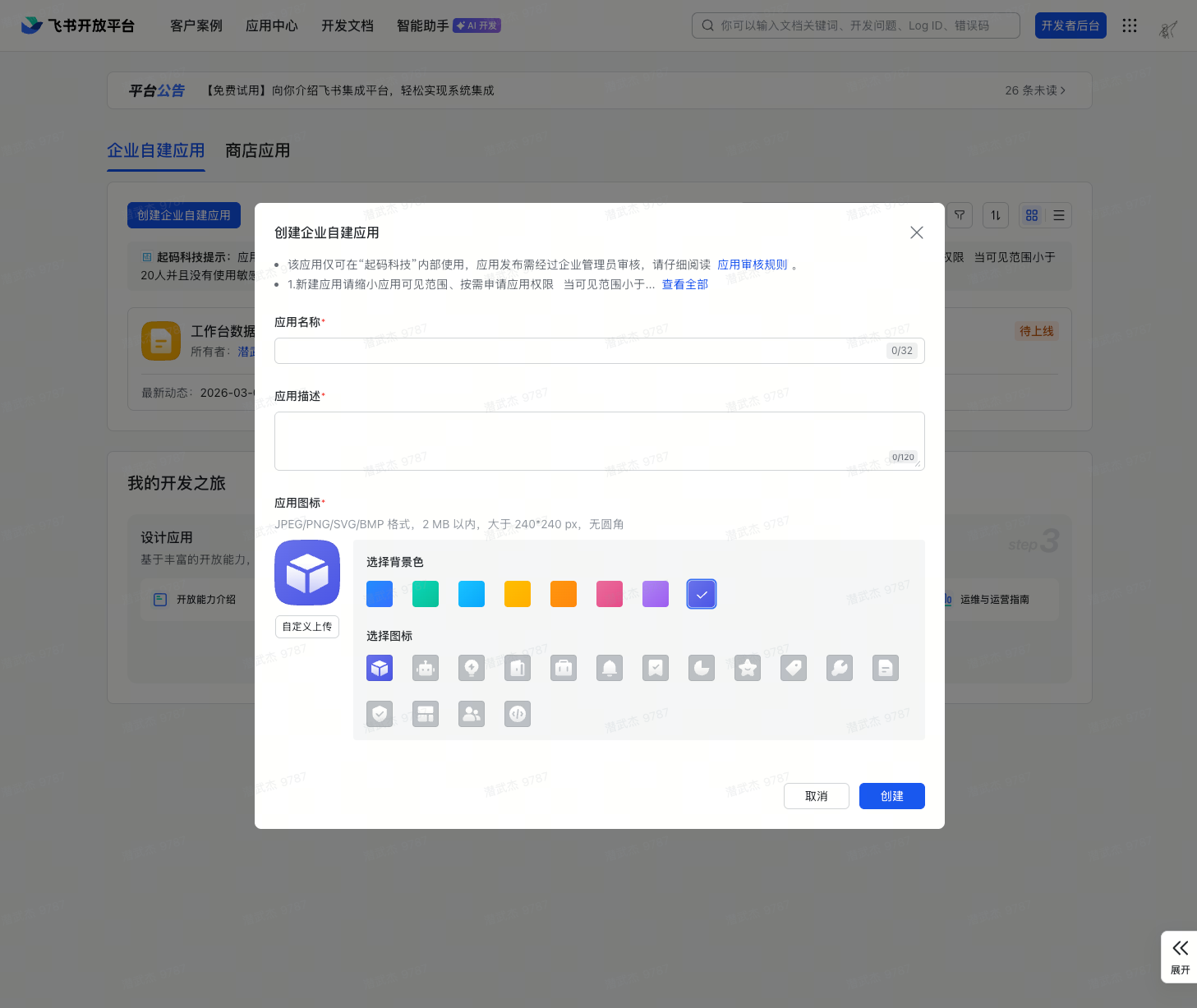
  1. Open Feishu Open Platform, log in and enter “Developer Console
  2. Click “Create Enterprise Self-built Application Create Enterprise Self-built Application
  3. Fill in the application name (e.g., “Data Workbench”) and description, then click Create

Step 2: Get Application Credentials

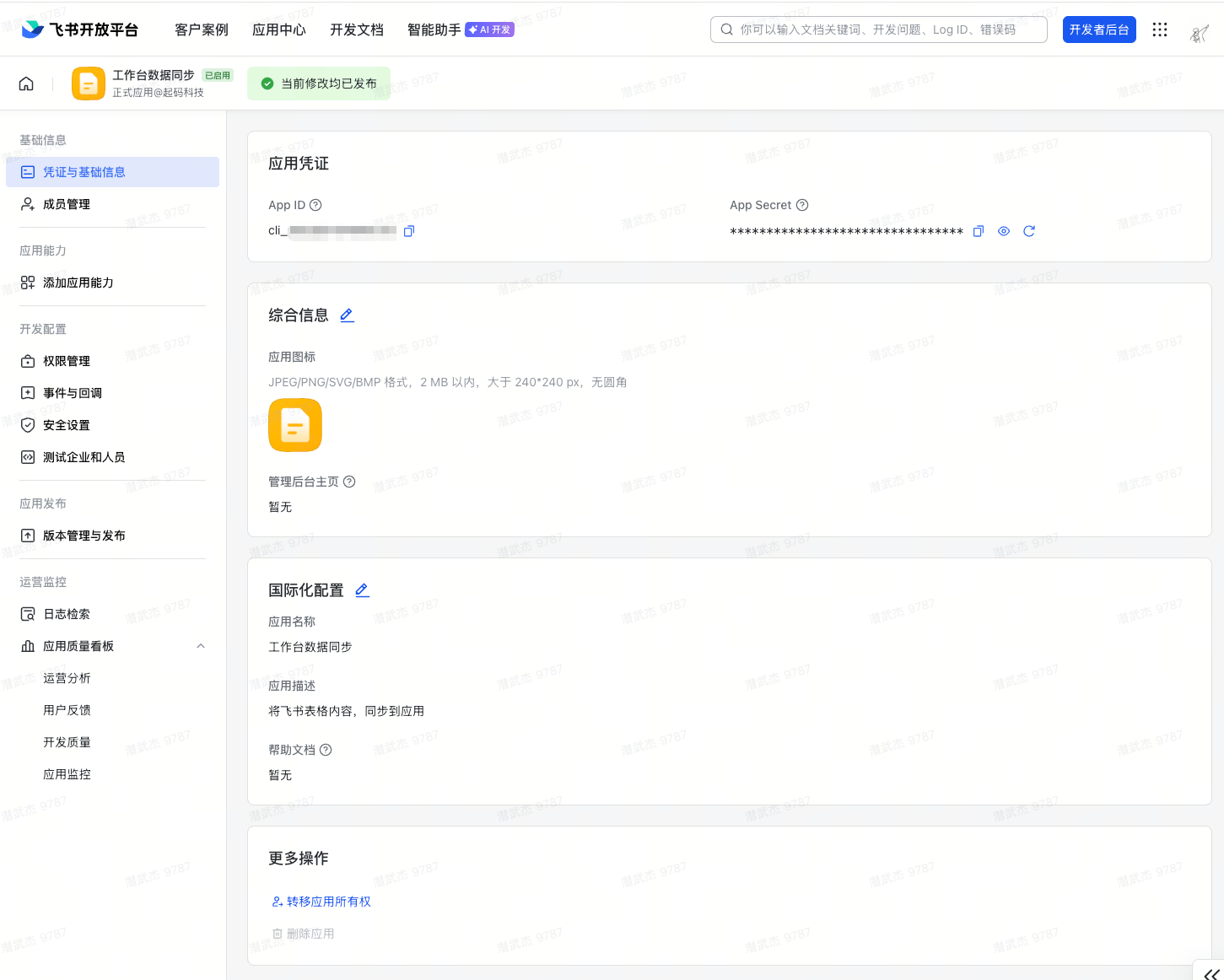
  1. Enter the application details page, select “Credentials & Basic Info” from the left menu
  2. Record App ID and App Secret Get Application Credentials
Example:
  • App ID: cli_a9xxxxxxxxxx ← Starts with cli_
  • App Secret: ************************ ← Keep secure, do not leak
⚠️ Note: App Secret is only displayed once. Please keep it secure. If lost, you need to regenerate it.

Step 3: Configure Application Permissions

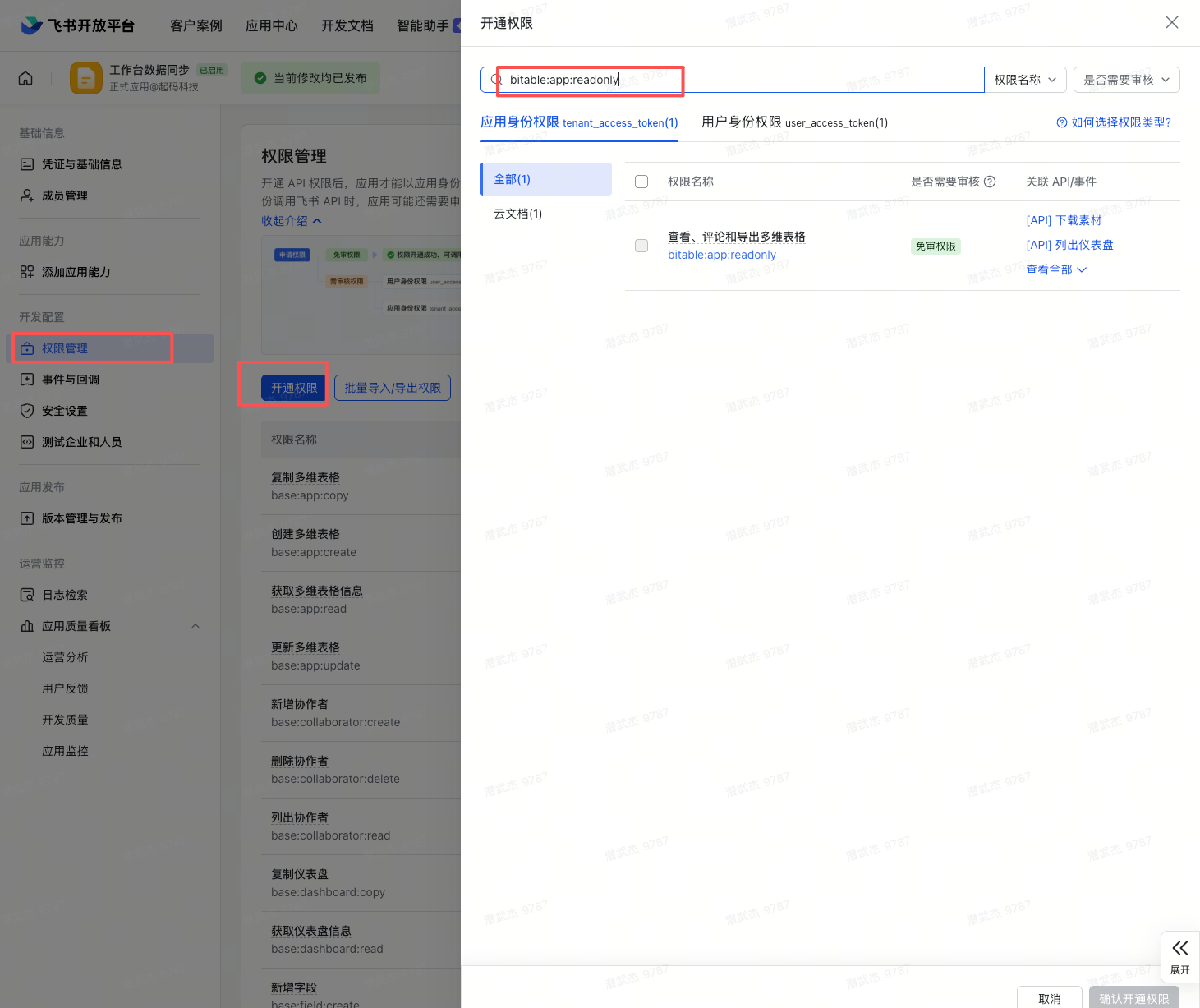
  1. Enter “Permission Management”, search and enable the following permissions:
Permission IDDescriptionRequired
bitable:app:readonlyRead multi-dimensional table data (tables, fields, records)Yes
wiki:wiki:readonlyRead knowledge base node information (for parsing wiki links)Only needed when table is embedded in knowledge base
Configure Application Permissions
  1. Create Version and Publish:
    • Left menu → “Version Management & Release
    • Create version → Fill in version number and update description
    • Submit for release (if it’s an enterprise internal application, usually auto-approved)
💡 Tip: After enabling permissions, you must create a version and publish it for permissions to take effect.

Step 4: Set Multi-dimensional Table Sharing Permissions

Ensure the Feishu application can access the target multi-dimensional table:
  1. Open multi-dimensional table → “Share” button in the top right corner
  2. Set link permission to “People with link in organization can read”
⚠️ Note: If permissions are set incorrectly, the application will not be able to access multi-dimensional table data.

III. Database Table Structure

The system uses 3 tables to store data:

data_sources — Data Source Configuration

CREATE TABLE data_sources (
  id                UUID DEFAULT gen_random_uuid() PRIMARY KEY,
  name              TEXT NOT NULL,              -- Data source name
  spreadsheet_token TEXT NOT NULL,              -- Multi-dimensional table app_token
  sheet_id          TEXT NOT NULL,              -- Data table table_id
  sheet_name        TEXT NOT NULL,              -- Data table name
  data_range        TEXT NOT NULL DEFAULT '',   -- View view_id (optional)
  feishu_app_id     TEXT NOT NULL,              -- Feishu app App ID
  feishu_app_secret TEXT NOT NULL,              -- Feishu app App Secret
  status            TEXT NOT NULL DEFAULT 'pending'
                    CHECK (status IN ('pending','active','syncing','error')),
  last_synced_at    TIMESTAMPTZ NOT NULL,
  row_count         INTEGER NOT NULL DEFAULT 0,
  column_headers     JSONB NOT NULL DEFAULT '[]', -- [{index, name, field_id}]
  created_at        TIMESTAMPTZ NOT NULL DEFAULT now(),
  updated_at        TIMESTAMPTZ NOT NULL DEFAULT now()
);

synced_rows — Synced Data Rows

CREATE TABLE synced_rows (
  id             UUID DEFAULT gen_random_uuid() PRIMARY KEY,
  data_source_id UUID NOT NULL REFERENCES data_sources(id),
  row_index      INTEGER NOT NULL,
  row_data       JSONB NOT NULL,   -- {"Field Name 1": "Value 1", "Field Name 2": "Value 2", ...}
  created_at     TIMESTAMPTZ NOT NULL DEFAULT now(),
  updated_at     TIMESTAMPTZ NOT NULL DEFAULT now()
);

CREATE INDEX idx_synced_rows_source ON synced_rows(data_source_id);
CREATE INDEX idx_synced_rows_index  ON synced_rows(data_source_id, row_index);

sync_logs — Sync Logs

CREATE TABLE sync_logs (
  id             UUID DEFAULT gen_random_uuid() PRIMARY KEY,
  data_source_id UUID NOT NULL REFERENCES data_sources(id),
  status         TEXT NOT NULL,    -- 'success' | 'failed'
  rows_synced    INTEGER NOT NULL DEFAULT 0,
  rows_added     INTEGER NOT NULL DEFAULT 0,
  rows_updated   INTEGER NOT NULL DEFAULT 0,
  rows_deleted   INTEGER NOT NULL DEFAULT 0,
  error_message  TEXT NOT NULL DEFAULT '',
  started_at     TIMESTAMPTZ NOT NULL,
  completed_at   TIMESTAMPTZ NOT NULL
);

CREATE INDEX idx_sync_logs_source  ON sync_logs(data_source_id);
CREATE INDEX idx_sync_logs_started ON sync_logs(started_at DESC);

IV. Backend: Edge Function Core Code

Edge Function feishu-sync is the core of the integration, providing 3 actions:

4.1 Get tenant_access_token

Prerequisite step for all Feishu API calls, exchange app credentials for access token:
const FEISHU_BASE_URL = "https://open.feishu.cn/open-apis";

async function getFeishuTenantToken(
  appId: string,
  appSecret: string
): Promise<string> {
  const response = await fetch(
    `${FEISHU_BASE_URL}/auth/v3/tenant_access_token/internal`,
    {
      method: "POST",
      headers: { "Content-Type": "application/json" },
      body: JSON.stringify({
        app_id: appId,        // cli_a9xxxxxxxxxx
        app_secret: appSecret  // ************************
      }),
    }
  );
  const result = await response.json();
  if (result.code !== 0) {
    throw new Error(`Failed to get token: ${result.msg}`);
  }
  return result.tenant_access_token; // Valid for about 2 hours
}

Supports two Feishu link formats:
FormatExample
/base/ direct linkhttps://xxx.feishu.cn/base/DQu7bPBrEaUxU2s9kkNcWz9zn1B
/wiki/ knowledge basehttps://xxx.feishu.cn/wiki/QFA2wYY62iTFuEkGusSchjomnOh?table=tblxxx
Parse URL Format:
// 1. Parse URL format
function parseFeishuUrl(urlOrToken: string) {
  if (urlOrToken.startsWith("http")) {
    const urlObj = new URL(urlOrToken);
    const pathParts = urlObj.pathname.split("/").filter(Boolean);
    // pathParts = ["wiki", "QFA2wYY..."] or ["base", "DQu7bP..."]
    return {
      token: pathParts[1],
      isWiki: pathParts[0] === "wiki"
    };
  }
  return { token: urlOrToken, isWiki: false };
}

// 2. If it's a wiki link, need to parse the actual bitable app_token
async function resolveWikiToken(accessToken: string, wikiToken: string) {
  const response = await fetch(
    `${FEISHU_BASE_URL}/wiki/v2/spaces/get_node?token=${wikiToken}`,
    { headers: { Authorization: `Bearer ${accessToken}` } }
  );
  const result = await response.json();
  // result.data.node.obj_token is the bitable app_token
  // result.data.node.obj_type should be "bitable"
  return result.data.node.obj_token;
}

// 3. List all data tables in the multi-dimensional table
async function listBitableTables(accessToken: string, appToken: string) {
  const response = await fetch(
    `${FEISHU_BASE_URL}/bitable/v1/apps/${appToken}/tables?page_size=100`,
    { headers: { Authorization: `Bearer ${accessToken}` } }
  );
  const result = await response.json();
  return result.data.items; // [{table_id, name, revision}, ...]
}
Complete validate Flow:
Credentials (App ID + Secret) + Link


  Get tenant_access_token


  Parse URL → Extract token + Determine wiki/base

        ├── wiki? → Call wiki API to parse as app_token


  Call bitable API to list data tables


  Return { valid: true, app_token, tables: [...] }

4.3 Action: metadata — Get Field Definitions

async function listBitableFields(
  accessToken: string,
  appToken: string,
  tableId: string
) {
  const response = await fetch(
    `${FEISHU_BASE_URL}/bitable/v1/apps/${appToken}/tables/${tableId}/fields?page_size=200`,
    { headers: { Authorization: `Bearer ${accessToken}` } }
  );
  const result = await response.json();
  return result.data.items;
  // [{field_id: "fldxxx", field_name: "Name", type: 1}, ...]
}

4.4 Action: sync — Full Data Sync

This is the core sync logic, steps as follows:
async function handleSync(dataSourceId: string) {
  // 1. Read data source configuration from database
  const dataSource = await supabase
    .from("data_sources").select("*")
    .eq("id", dataSourceId).single();

  // 2. Get Feishu access token
  const accessToken = await getFeishuTenantToken(
    dataSource.feishu_app_id,
    dataSource.feishu_app_secret
  );

  // 3. Get field definitions (for column_headers)
  const fields = await listBitableFields(
    accessToken,
    dataSource.spreadsheet_token,  // Stored as app_token
    dataSource.sheet_id             // Stored as table_id
  );

  // 4. Paginate and fetch all records
  const { records } = await listBitableRecords(
    accessToken,
    dataSource.spreadsheet_token,
    dataSource.sheet_id,
    dataSource.data_range || undefined  // Optional view_id
  );

  // 5. Transform record format, extract display values
  const rows = records.map((record, index) => ({
    data_source_id: dataSourceId,
    row_index: index,
    row_data: Object.fromEntries(
      fields.map(f => [f.field_name, extractDisplayValue(record.fields[f.field_name])])
    ),
  }));

  // 6. Write to database (delete then insert)
  await supabase.from("synced_rows").delete().eq("data_source_id", dataSourceId);
  // Batch insert, 500 records per batch
  for (let i = 0; i < rows.length; i += 500) {
    await supabase.from("synced_rows").insert(rows.slice(i, i + 500));
  }

  // 7. Update data source status + Write sync logs
  await supabase.from("data_sources").update({
    status: "active",
    row_count: records.length,
    column_headers: fields.map((f, i) => ({ index: i, name: f.field_name })),
    last_synced_at: new Date().toISOString(),
  }).eq("id", dataSourceId);

  await supabase.from("sync_logs").insert({
    data_source_id: dataSourceId,
    status: "success",
    rows_synced: records.length,
    rows_added: addedCount,
    rows_updated: updatedCount,
    rows_deleted: deletedCount,
    // ...
  });
}

4.5 Multi-dimensional Table Field Value Extraction

Bitable field value formats vary by type, need to uniformly extract as displayable strings:
function extractFieldDisplayValue(value: unknown): string {
  if (value === null || value === undefined) return "";
  if (typeof value === "string") return value;
  if (typeof value === "number") return String(value);
  if (typeof value === "boolean") return value ? "Yes" : "No";

  // Array types: multi-select, personnel, rich text, etc.
  if (Array.isArray(value)) {
    return value.map(item => {
      if (typeof item === "string") return item;
      if (item?.text) return item.text;   // Rich text
      if (item?.name) return item.name;   // Personnel
      return JSON.stringify(item);
    }).join(", ");
  }

  // Object types: hyperlinks, etc.
  if (typeof value === "object") {
    if (value.text) return value.text;
    if (value.link) return value.link;
    return JSON.stringify(value);
  }

  return String(value);
}
Common Field Types and Value Formats:
Field TypetypeValue Example
Text1[{type:"text", text:"Hello"}]
Number2123.45
Single Select3"Option A"
Multi Select4["Option A", "Option B"]
Date51709251200000 (millisecond timestamp)
Checkbox7true / false
Personnel11[{id:"xxx", name:"John"}]
Hyperlink15{text:"Click", link:"https://..."}

V. Frontend: React Hooks Call Layer

5.1 Validate Connection

// hooks/useFeishuSync.ts
export function useValidateFeishu() {
  return useMutation({
    mutationFn: async (input: {
      feishu_app_id: string;
      feishu_app_secret: string;
      bitable_url: string;
    }) => {
      const { data, error } = await supabase.functions.invoke("feishu-sync", {
        body: { action: "validate", ...input },
      });
      if (error) throw error;
      return data; // { valid, app_token, tables: [...] }
    },
  });
}

5.2 Trigger Sync

export function useSyncDataSource() {
  const queryClient = useQueryClient();
  return useMutation({
    mutationFn: async (dataSourceId: string) => {
      const { data, error } = await supabase.functions.invoke("feishu-sync", {
        body: { action: "sync", data_source_id: dataSourceId },
      });
      if (error) throw error;
      return data; // { status, rows_synced, rows_added, ... }
    },
    onSuccess: () => {
      // Automatically refresh related queries after sync completes
      queryClient.invalidateQueries({ queryKey: ["data-sources"] });
      queryClient.invalidateQueries({ queryKey: ["synced-rows"] });
      queryClient.invalidateQueries({ queryKey: ["sync-logs"] });
    },
  });
}

5.3 Data Source CRUD

// hooks/useDataSources.ts
export function useCreateDataSource() {
  return useMutation({
    mutationFn: async (input) => {
      const { data, error } = await supabase
        .from("data_sources")
        .insert({
          name: input.name,
          spreadsheet_token: input.app_token,    // Store app_token
          sheet_id: input.table_id,              // Store table_id
          sheet_name: input.table_name,
          data_range: input.view_id || "",        // Store view_id
          feishu_app_id: input.feishu_app_id,
          feishu_app_secret: input.feishu_app_secret,
          status: "pending",
          row_count: 0,
          column_headers: [],
        })
        .select().single();
      if (error) throw error;
      return data;
    },
  });
}

VI. Complete Integration Flow Diagram


VII. Common Issues Troubleshooting

Error MessageCauseSolution
Failed to get access token (code: 10003)App ID or App Secret is incorrectCheck if credentials are copied correctly
Access denied…wiki:wiki:readonlyApplication lacks knowledge base read permissionEnable wiki:wiki:readonly permission and publish new version
Failed to get data table list (code: 99991668)Application lacks multi-dimensional table permissionEnable bitable:app:readonly permission
Failed to get records (code: 1254607)Application has no access to the multi-dimensional tableSet multi-dimensional table link sharing to “People with link in organization can read”
This knowledge base node is not a multi-dimensional tableLink points to a document instead of multi-dimensional tableConfirm the pasted link actually points to a multi-dimensional table page
Cannot parse Token from URLURL format is incorrectUse complete link in /wiki/xxx or /base/xxx format
violates check constraintDatabase status constraint mismatchCheck if status field’s check constraint includes required value

superun Website

Visit this website to learn more about features and examples.