

Automatic SEO Features
superun applies the following SEO optimizations automatically across all generated pages:- Keep
<title>tags concise (~60 characters) with primary keywords - Write meta descriptions (~160 characters) based on page intent and natural keyword usage
- Ensure exactly one
<h1>per page - Structure content with semantic HTML elements
- Add descriptive, keyword-relevant image alt text
- Add JSON-LD structured data for public-facing review widgets, listings, and detail pages when applicable
- Lazy-load images and defer non-critical scripts
- Automatically generate canonical URLs
- Apply mobile-first responsive layouts with correct viewport settings
- Use clean, human-readable URLs
- Automatically apply SEO metadata (title, description, canonical) to AI-generated pages
- Apply
noindexto internal system pages (Analytics, Reports, Settings, Team, Integrations) to prevent indexing of administrative routes - Automatically include Open Graph metadata from your Website Info settings (Title, Description, OG Image)
Website Info (Global SEO Settings)
Under Launch → SEO, you can configure global metadata for your project:- Website Title — Used in
<title>and Open Graph tags - Description — Used for page-level meta descriptions and social sharing
- Image (OG Image) — Displayed when your site is shared on social media
- Icon — Used for browser tabs and bookmarks
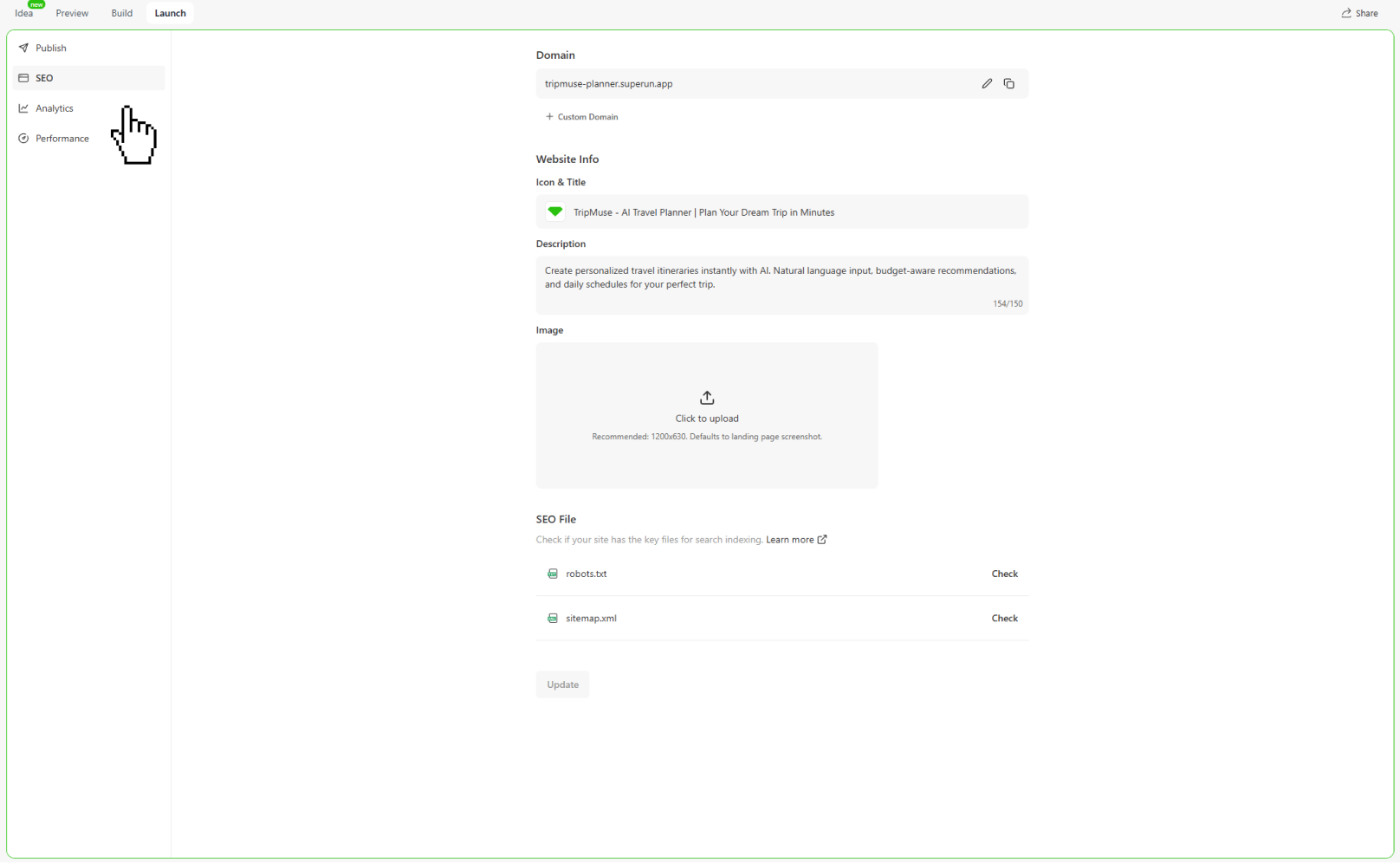
Generating SEO Files
superun makes it easy to create essential SEO files (robots.txt and sitemap.xml) directly from the interface:
- Click “Launch” in the top navigation bar.
- In the left sidebar, select “SEO”.
- Under SEO File, click “Generate” next to
robots.txtorsitemap.xml.
robots.txt
Controls which pages search engines can access.
sitemap.xml
Provides a complete list of public-facing URLs for search engine indexing.
Both files update automatically when your project structure changes.
Built-in Page Speed Optimization
Performance diagnostics have moved to the Performance tab under Launch. superun includes a built-in speed audit powered by Google Lighthouse to identify opportunities for:- Faster page rendering
- Better SEO scoring
- Improved accessibility
- Optimized user experience
- Click “Launch” → Performance
- Review Lighthouse category scores
- Use Try to fix to apply recommended improvements
Tips and Tricks
Sitemap for Search Engine Indexing
Sitemap for Search Engine Indexing
A sitemap helps search engines discover and index your website efficiently.
- Go to Launch → SEO and click “Generate” next to
sitemap.xml. - Submit your sitemap in Google Search Console to improve crawling:
https://yourdomain/sitemap.xml - The sitemap reference is automatically included inside
robots.txtwhen both files are generated.
curl https://yourdomain/sitemap.xmlRobots.txt Configuration for Search Control
Robots.txt Configuration for Search Control
robots.txt tells search engines which areas of your site they should or should not crawl.- Go to Launch → SEO and click “Generate”.
- The default configuration allows all pages except system pages that superun marks as
noindex.
Internal Linking for Better SEO
Internal Linking for Better SEO
Internal linking helps search engines understand your content structure and distribute ranking authority.superun can help:
- Suggest relevant internal links
- Maintain logical navigation hierarchy
- Improve crawl depth and context
More tips
More tips
- Keep pages unique and updated
- Add meaningful alt text and compress assets
- Target long-tail keywords
- Add structured data where relevant
- Ensure each page has a clear focus
FAQ
How long does indexing take?
How long does indexing take?
Indexing usually takes a few hours to several days. Submitting your
sitemap.xml accelerates discovery.What if I don’t see rankings?
What if I don’t see rankings?
Verify your sitemap, review content quality, internal linking, page speed, mobile experience, and ensure
noindex is not applied unintentionally.Does superun support mobile SEO?
Does superun support mobile SEO?
Yes. All superun projects use mobile-first responsive layouts and proper viewport settings by default.
superun Website
Visit the website to explore more features and examples.