

What is Temporary Chat?
When superun is generating styles for your project, clicking the input field will automatically open a temporary chat interface. This allows you to interact with the AI consultant completely free of charge while waiting for the generation to complete.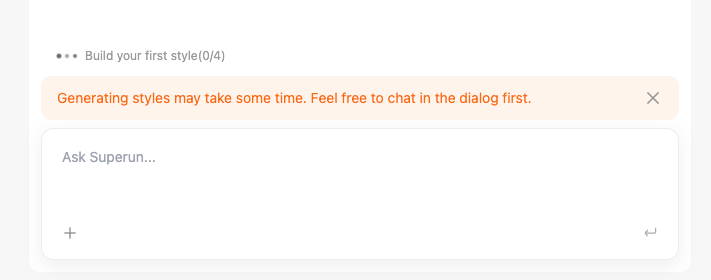
Key Features
- Completely free – No Credits or charges for using temporary chat during generation
- Automatic activation – Chat automatically opens when you click the input field during generation
- Product and design consultation – Ask questions about your product and design while waiting
- Non-blocking – Generation continues in the background while you chat
- Dismissible – You can close the chat banner if you prefer to wait without chatting
When Does It Appear?
The temporary chat becomes available during the generation of 4 styles phase. Since the generation process may take some time, clicking the input field will open the chat interface to help you make productive use of the waiting period.What Can You Ask?
During the temporary chat, you can:- Discuss your project goals – Share ideas about what you want to build
- Get design recommendations – Ask for suggestions on layout, colors, or UI elements
- Clarify requirements – Better understand what you need before generation completes
- Learn about features – Ask questions about superun’s capabilities
- Plan next steps – Think ahead about what you’ll do after generation finishes
How to Use
- Wait for generation to start – Style generation begins with 4 stages
- See the notification banner – A banner appears: “Generating styles may take some time. Feel free to chat in the dialog first.”
- Click the input field – Clicking the input field automatically opens the temporary chat dialog
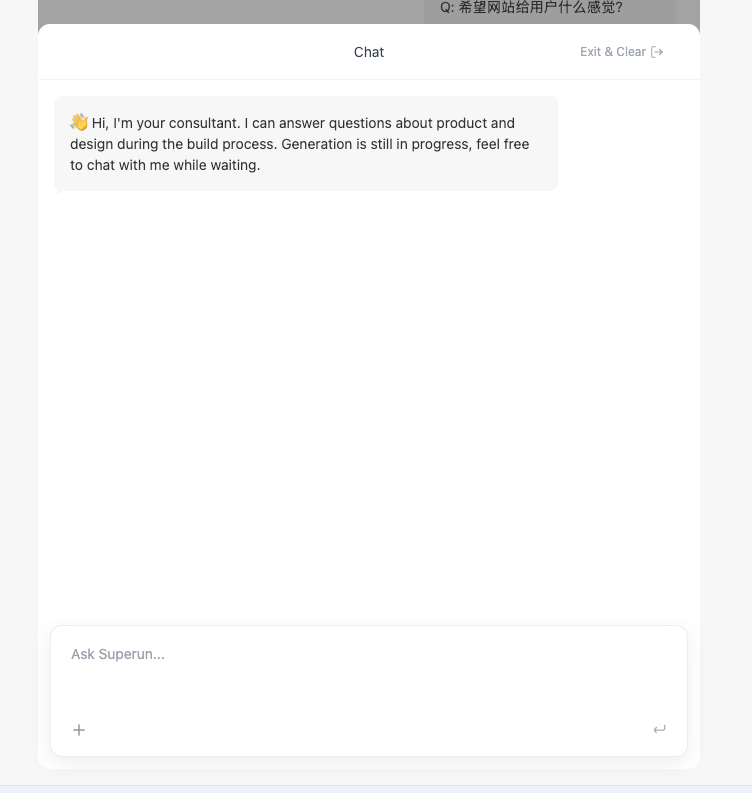
- Ask questions – Type your questions in the chat input field
- Continue chatting – The chat remains available throughout the generation process
Difference from Ask
Temporary Chat (this feature):- Automatically opens when clicking the input field during style generation
- Available only during the generation wait time
- Focused on product and design questions during the build process
- Manually activated by selecting it in the bottom-right corner
- Available at any time, not just during generation
- Designed for understanding your project without making changes
superun Website
Visit the website to learn more features and examples.