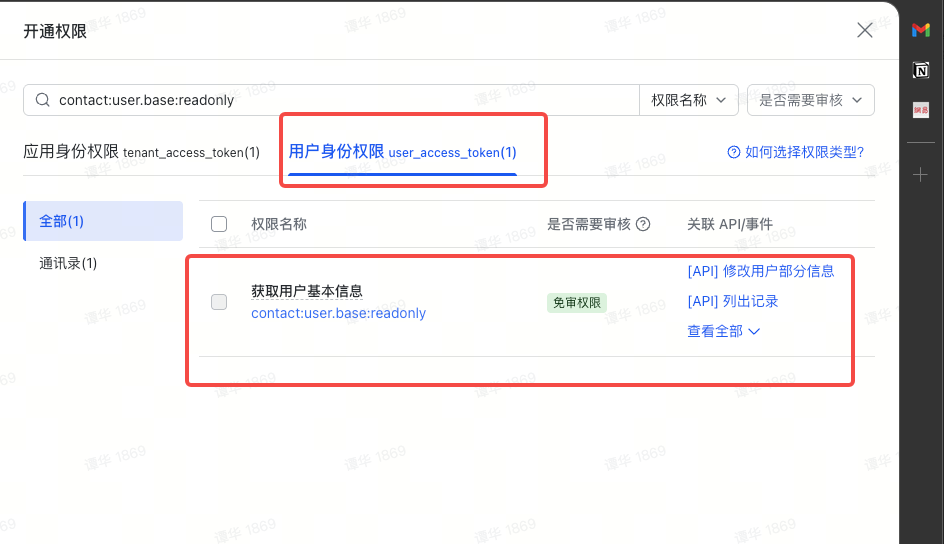
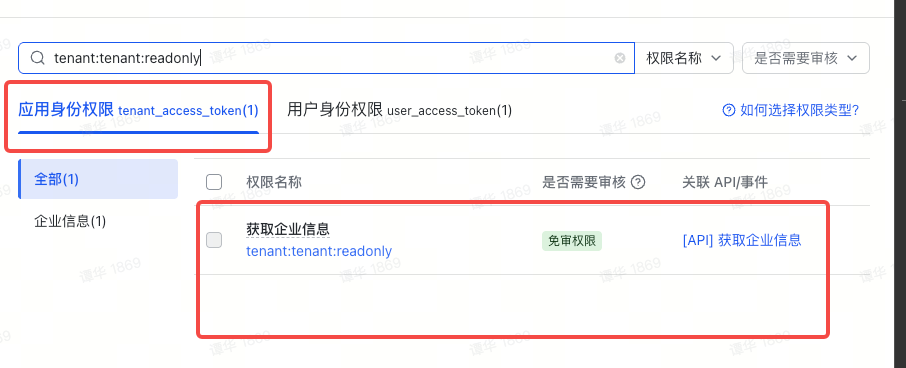
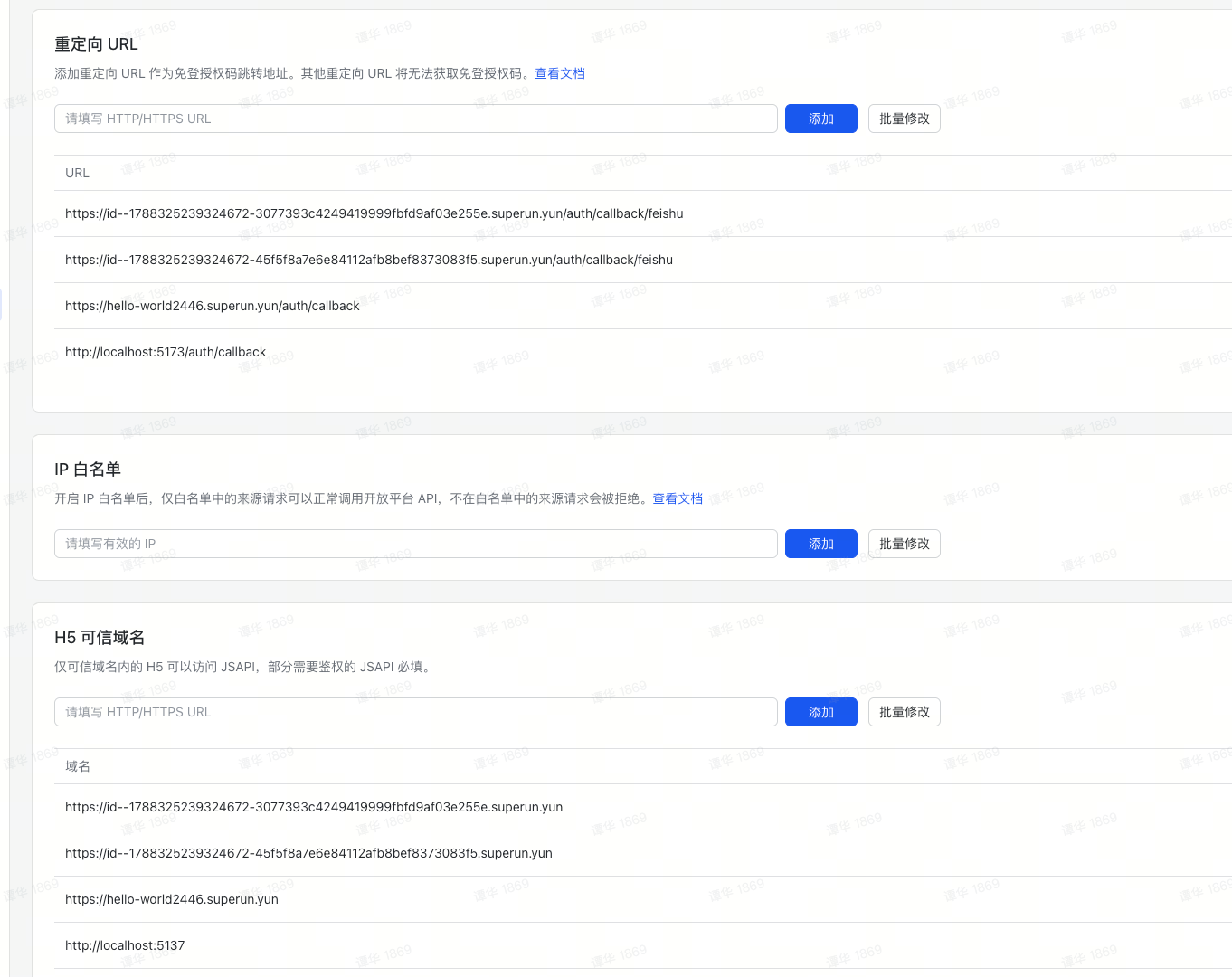
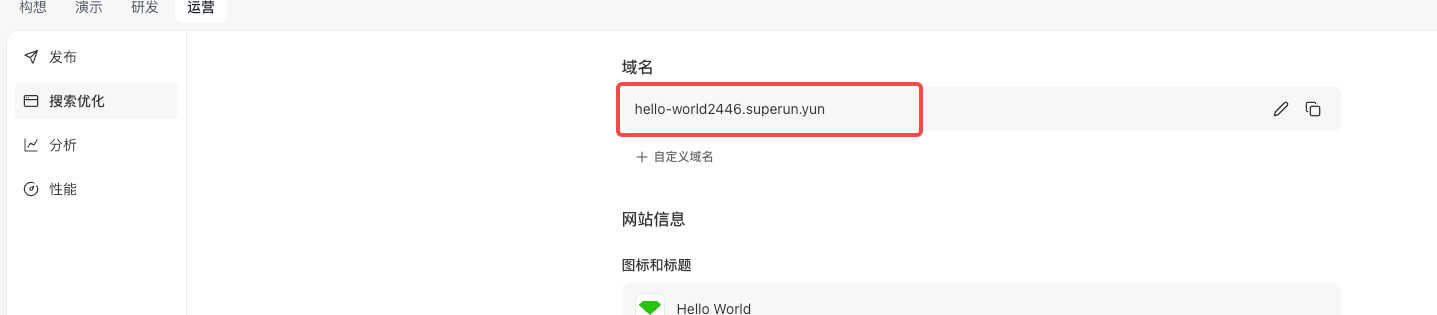
// supabase/functions/feishu-auth/index.ts
serve(async (req) => {
  if (req.method === "OPTIONS") {
    return new Response("ok", { headers: corsHeaders });
  }
  const feishuAppId = Deno.env.get("SUPERUN_FEISHU_APP_ID");
  const feishuAppSecret = Deno.env.get("SUPERUN_FEISHU_APP_SECRET");
  const allowedTenantKeys = Deno.env.get("SUPERUN_FEISHU_ALLOWED_TENANT_KEYS") || "";
  const supabaseUrl = Deno.env.get("SUPABASE_URL")!;
  const supabaseServiceRoleKey = Deno.env.get("SUPABASE_SERVICE_ROLE_KEY")!;
  if (!feishuAppId || !feishuAppSecret) {
    logStep("ERROR", { message: "Missing FEISHU_APP_ID or FEISHU_APP_SECRET" });
    return new Response(
      JSON.stringify({ error: "Server configuration error" }),
      { headers: { ...corsHeaders, "Content-Type": "application/json" }, status: 500 }
    );
  }
  // Supabase Admin client (bypasses RLS)
  const supabaseAdmin = createClient(supabaseUrl, supabaseServiceRoleKey, {
    auth: { autoRefreshToken: false, persistSession: false },
  });
  const { code, redirect_uri } = await req.json();
  if (!code) {
    return new Response(
      JSON.stringify({ error: "Authorization code is required" }),
      { headers: { ...corsHeaders, "Content-Type": "application/json" }, status: 400 }
    );
  }
  // ── Step 1: Exchange code for user_access_token (Feishu v2 API) ──
  logStep("Step 1: Exchanging code for user_access_token");
  const tokenResponse = await fetch(
    "https://open.feishu.cn/open-apis/authen/v2/oauth/token",
    {
      method: "POST",
      headers: { "Content-Type": "application/json; charset=utf-8" },
      body: JSON.stringify({
        grant_type: "authorization_code",
        client_id: feishuAppId,
        client_secret: feishuAppSecret,
        code,
        redirect_uri,
      }),
    }
  );
  const tokenData = await tokenResponse.json();
  if (tokenData.code !== 0 || !tokenData.access_token) {
    logStep("ERROR: Token exchange failed", {
      code: tokenData.code,
      error: tokenData.error,
      description: tokenData.error_description,
    });
    return new Response(
      JSON.stringify({
        error: "Token exchange failed",
        detail: tokenData.error_description || tokenData.error || "Unknown error",
      }),
      { headers: { ...corsHeaders, "Content-Type": "application/json" }, status: 401 }
    );
  }
  logStep("Step 1 completed", { expires_in: tokenData.expires_in });
  // ── Step 2: Get user info from Feishu ──
  logStep("Step 2: Fetching user info");
  const userInfoResponse = await fetch(
    "https://open.feishu.cn/open-apis/authen/v1/user_info",
    {
      method: "GET",
      headers: {
        Authorization: `Bearer ${tokenData.access_token}`,
        "Content-Type": "application/json; charset=utf-8",
      },
    }
  );
  const userInfoData = await userInfoResponse.json();
  if (userInfoData.code !== 0) {
    logStep("ERROR: Failed to fetch user info", { code: userInfoData.code, msg: userInfoData.msg });
    return new Response(
      JSON.stringify({ error: "Failed to get user info", detail: userInfoData.msg }),
      { headers: { ...corsHeaders, "Content-Type": "application/json" }, status: 401 }
    );
  }
  const feishuUser = userInfoData.data;
  const tenantKey = feishuUser.tenant_key;
  logStep("Step 2 completed", {
    name: feishuUser.name,
    tenant_key: tenantKey,
    open_id: feishuUser.open_id,
  });
  // ── Step 3: Enterprise whitelist validation (optional) ──
  // 如果 SUPERUN_FEISHU_ALLOWED_TENANT_KEYS 未配置或為空,則跳過白名單校驗,允許所有企業登入
  logStep("Step 3: Validating tenant_key (optional)");
  const allowedList = allowedTenantKeys
    .split(",")
    .map((key: string) => key.trim())
    .filter(Boolean);
  if (allowedList.length > 0 && !allowedList.includes(tenantKey)) {
    logStep("REJECTED: Tenant not in whitelist", {
      tenant_key: tenantKey,
      allowed: allowedList,
    });
    return new Response(
      JSON.stringify({
        error: "access_denied",
        message: "您的企業未被授權存取此應用",
        tenant_key: tenantKey,
      }),
      { headers: { ...corsHeaders, "Content-Type": "application/json" }, status: 403 }
    );
  }
  logStep("Step 3 completed: Tenant validated (or whitelist disabled)");
  // 遵循第三方 OAuth 通用架構
  // ── Step 4: Find or create Supabase user via user_identities table ──
  logStep("Step 4: Finding or creating Supabase user");
  const oauthProvider = "feishu";
  const oauthOpenId = feishuUser.open_id;
  // 固定使用虛擬信箱,避免與用戶用真實信箱註冊的帳號衝突
  const userEmail = `feishu_${oauthOpenId}@oauth.local`;
  const userMetadata = {
    oauth_provider: oauthProvider,
    oauth_open_id: oauthOpenId,
    name: feishuUser.name,
    en_name: feishuUser.en_name,
    avatar_url: feishuUser.avatar_url,
    tenant_key: tenantKey,
    ...feishuUser,
  };
  // Query user_identities table (service_role bypasses RLS)
  const { data: existingIdentity } = await supabaseAdmin
    .from("user_identities")
    .select("id")
    .eq("oauth_provider", oauthProvider)
    .eq("oauth_open_id", oauthOpenId)
    .single();
  if (existingIdentity) {
    logStep("User exists, updating metadata", { userId: existingIdentity.id });
    // Update auth user metadata
    await supabaseAdmin.auth.admin.updateUserById(existingIdentity.id, {
      user_metadata: userMetadata,
    });
    // Sync user_identities table
    await supabaseAdmin
      .from("user_identities")
      .update({
        raw_metadata: userMetadata,
        updated_at: new Date().toISOString(),
      })
      .eq("id", existingIdentity.id);
  } else {
    logStep("New user, creating Supabase account", { email: userEmail });
    const { error: createError } = await supabaseAdmin.auth.admin.createUser({
      email: userEmail,
      email_confirm: true,
      user_metadata: userMetadata,
    });
    if (createError) {
      logStep("ERROR: Failed to create user", { message: createError.message });
      return new Response(
        JSON.stringify({ error: "Failed to create user account", detail: createError.message }),
        { headers: { ...corsHeaders, "Content-Type": "application/json" }, status: 500 }
      );
    }
    // Trigger automatically creates user_identities row
  }
  // ── Step 5: Generate magic link token for session establishment ──
  logStep("Step 5: Generating magic link token");
  const { data: linkData, error: linkError } = await supabaseAdmin.auth.admin.generateLink({
    type: "magiclink",
    email: userEmail,
  });
  if (linkError || !linkData) {
    logStep("ERROR: Failed to generate link", { message: linkError?.message });
    return new Response(
      JSON.stringify({ error: "Failed to generate session token", detail: linkError?.message }),
      { headers: { ...corsHeaders, "Content-Type": "application/json" }, status: 500 }
    );
  }
  const hashedToken = linkData.properties?.hashed_token;
  if (!hashedToken) {
    logStep("ERROR: No hashed_token in response", { linkData });
    return new Response(
      JSON.stringify({ error: "Failed to generate session token" }),
      { headers: { ...corsHeaders, "Content-Type": "application/json" }, status: 500 }
    );
  }
  logStep("Step 5 completed: Token generated");
  return new Response(
    JSON.stringify({
      token_hash: hashedToken,
      user: feishuUser,
    }),
    {
      headers: { ...corsHeaders, "Content-Type": "application/json" },
      status: 200,
    }
  );
});