跳转到主要内容

一、整体架构

本方案基于飞书 OAuth 2.0 授权码流程,通过飞书官方二维码 SDK 在网页内嵌入扫码区域,用户扫码后由后端 Edge Function 完成令牌交换和身份校验,最终实现”只有特定企业员工才能登录”的访问控制。

二、飞书端配置(5 步)

步骤 1:创建应用并获取凭证

  1. 打开 飞书开放平台,登录后进入「开发者后台
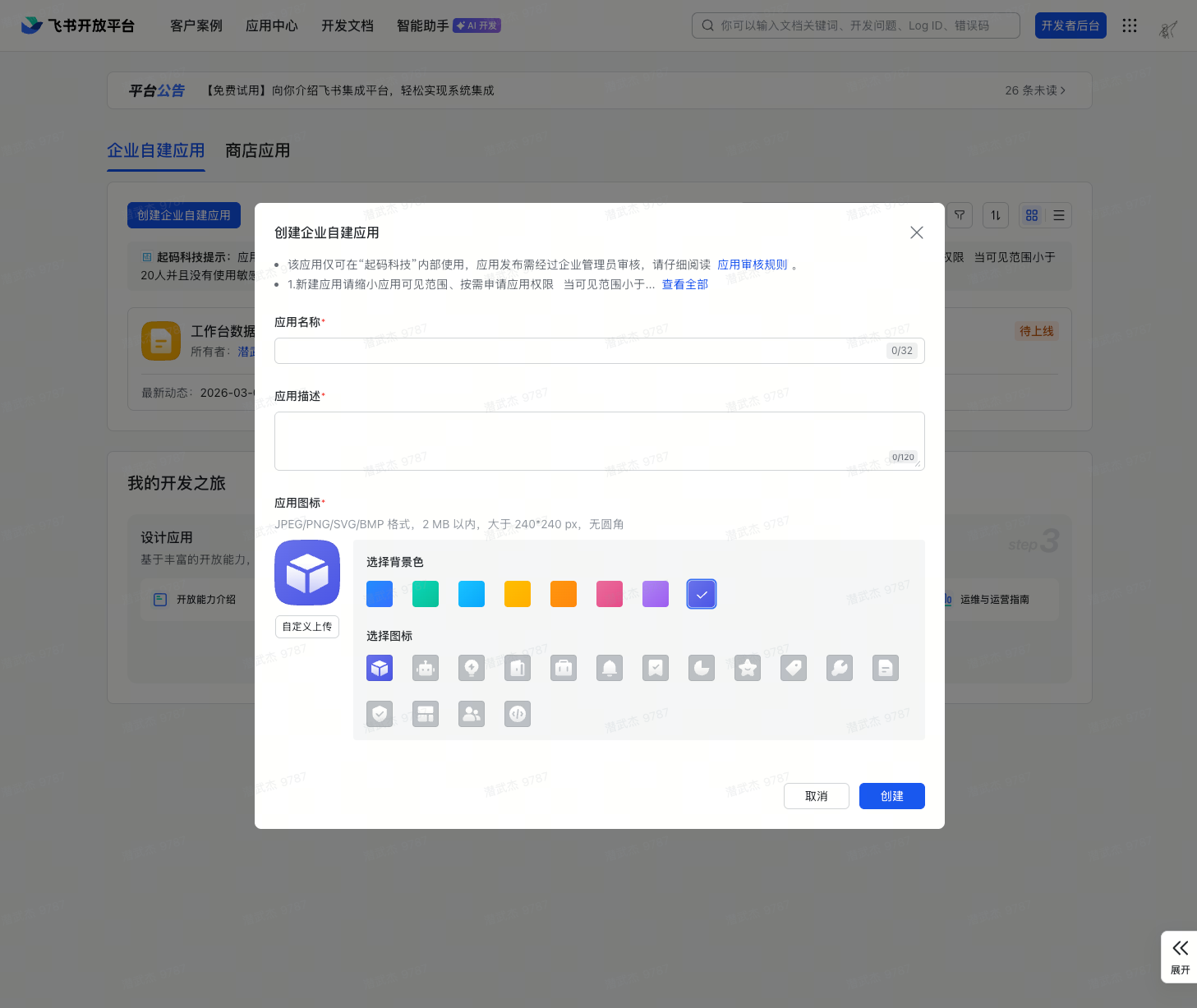
  2. 点击「创建企业自建应用 创建企业自建应用
  3. 填写应用名称(如「数据工作台」)和描述,点击创建
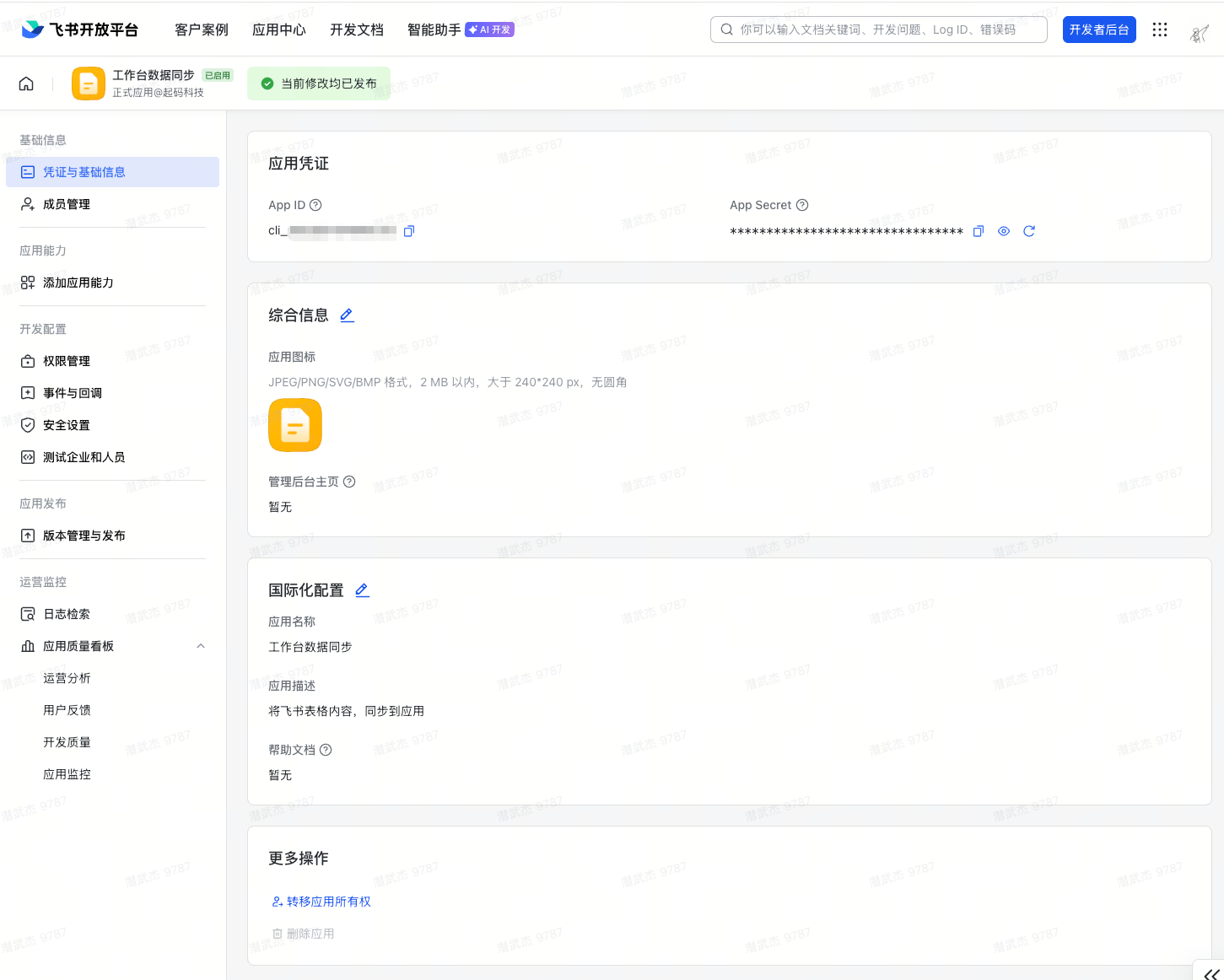
  4. 创建完成后进入应用详情页,左侧菜单选择「凭证与基础信息
  5. 记录 App IDApp Secret——分别对应环境变量 SUPERUN_FEISHU_APP_IDSUPERUN_FEISHU_APP_SECRET 获取应用凭证

步骤 2:添加网页能力

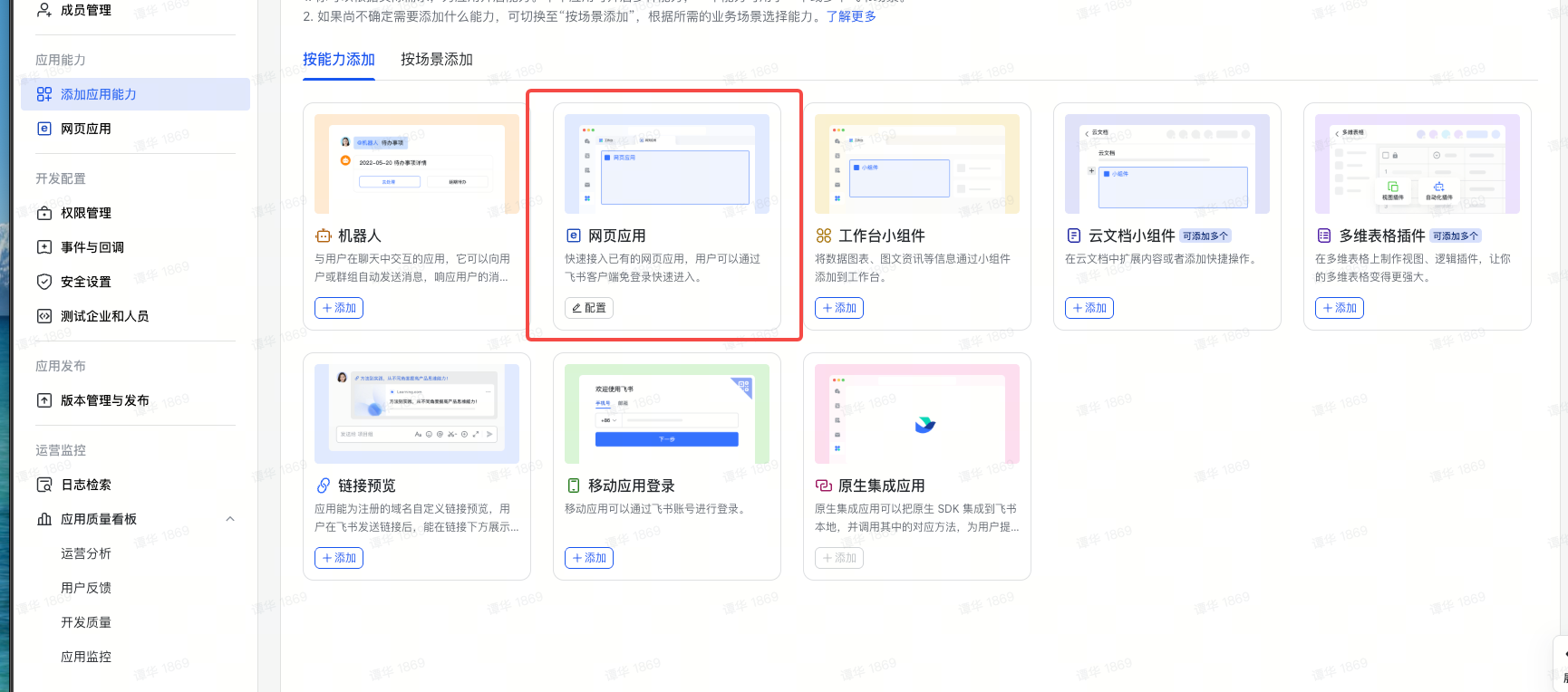
  1. 在应用详情页,点击「添加应用能力」,选择「网页应用
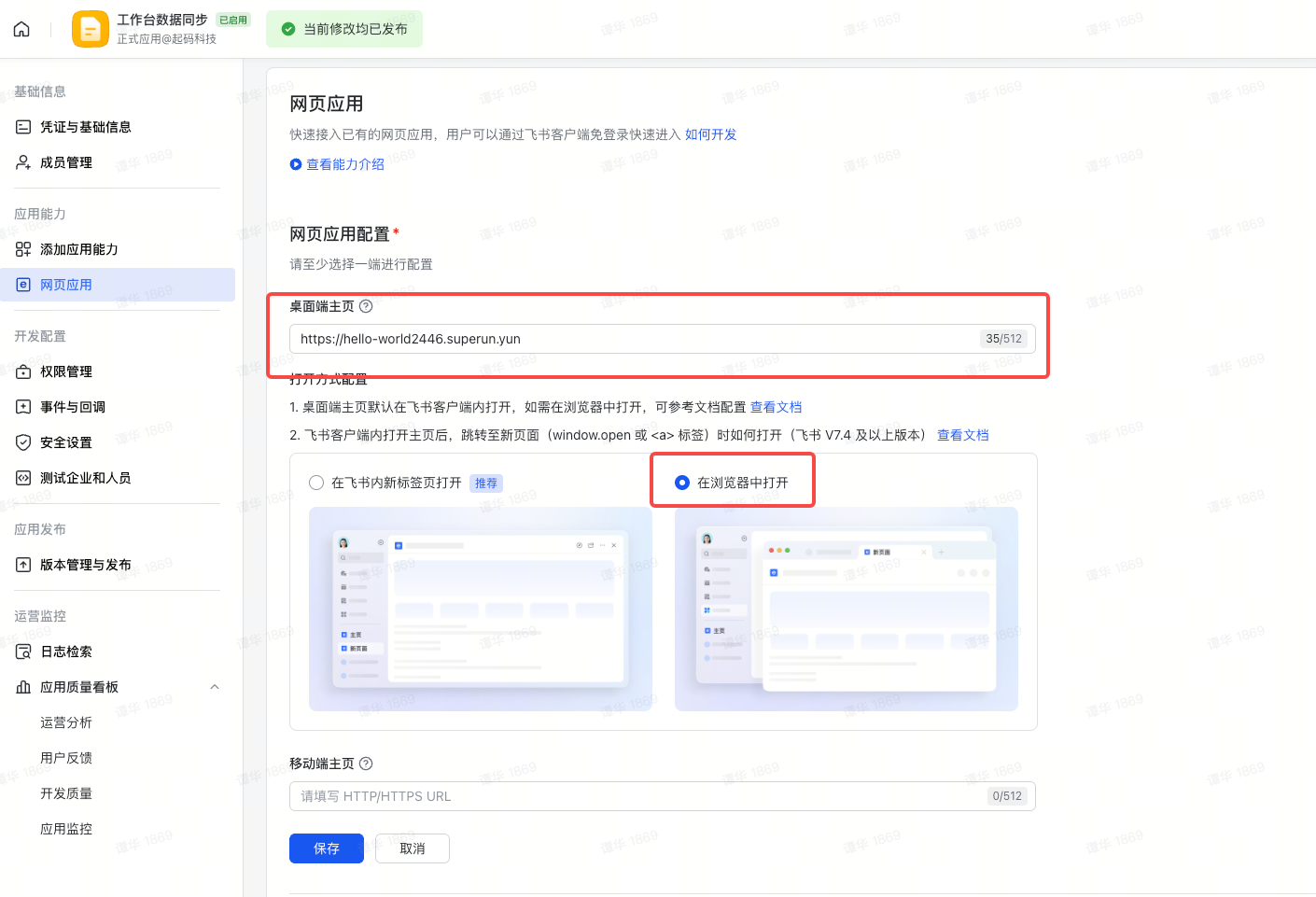
  2. 填写桌面端主页 URL 为 SUPERUN 发布后的地址,选择浏览器打开 添加网页应用 网页能力填写

步骤 3:配置应用权限

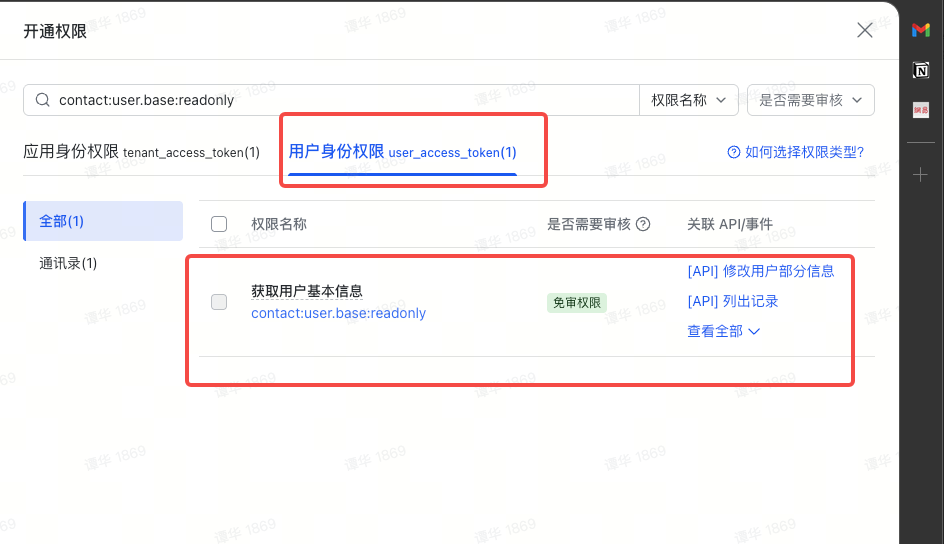
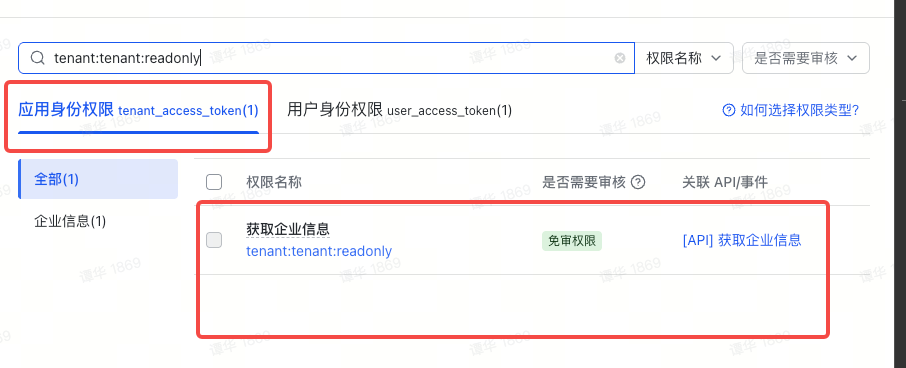
  1. 进入「权限管理」,搜索并开通以下权限:
权限标识说明必须分类
contact:user.base:readonly读取用户信息用户身份权限
tenant:tenant:readonly获取企业信息仅白名单校验时需要应用身份权限
配置应用权限 配置应用权限

步骤 4:配置安全设置(可信域名 & 重定向 URL)

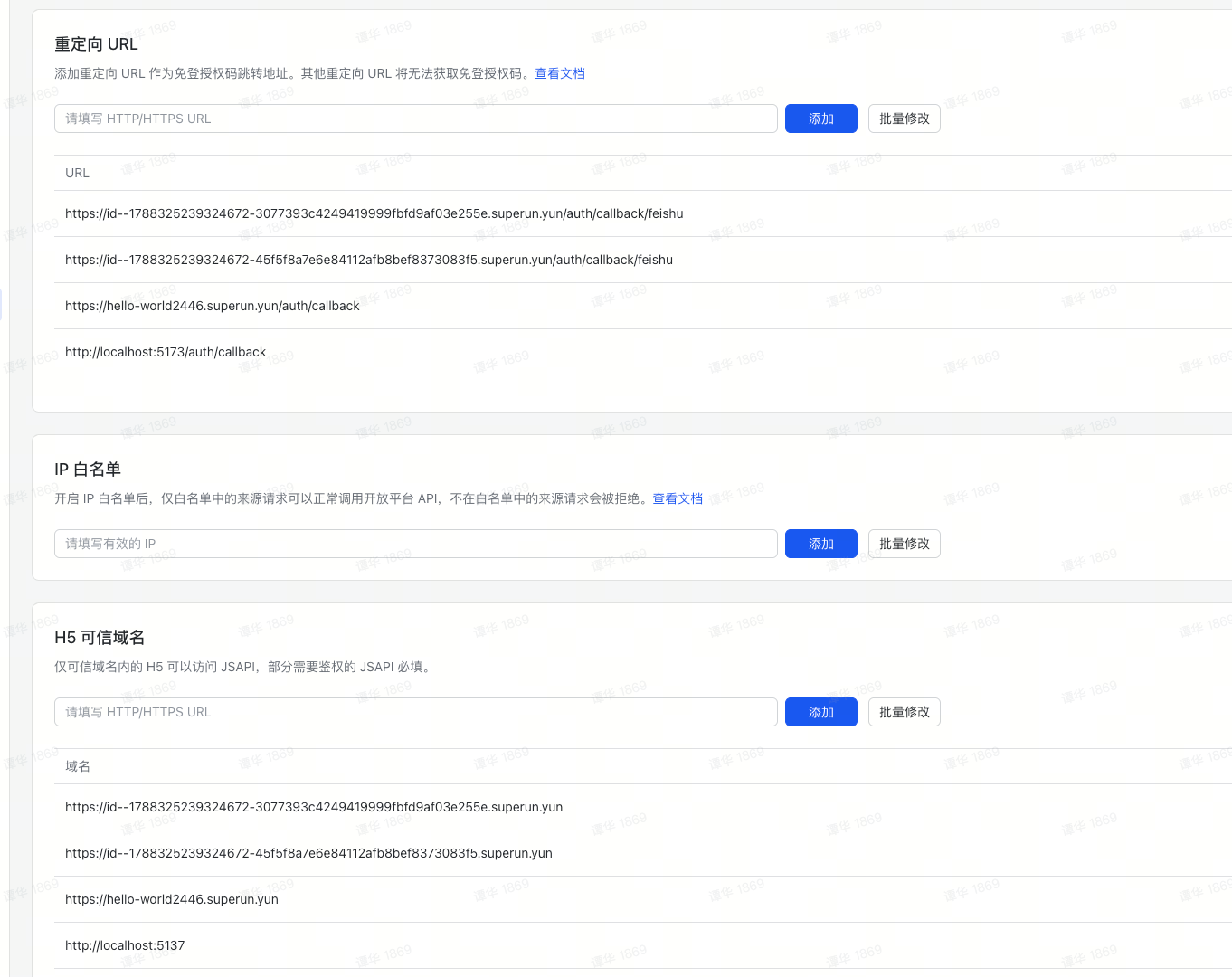
  1. 进入「安全设置
  2. 添加 H5 可信域名——需要填写以下两个域名:
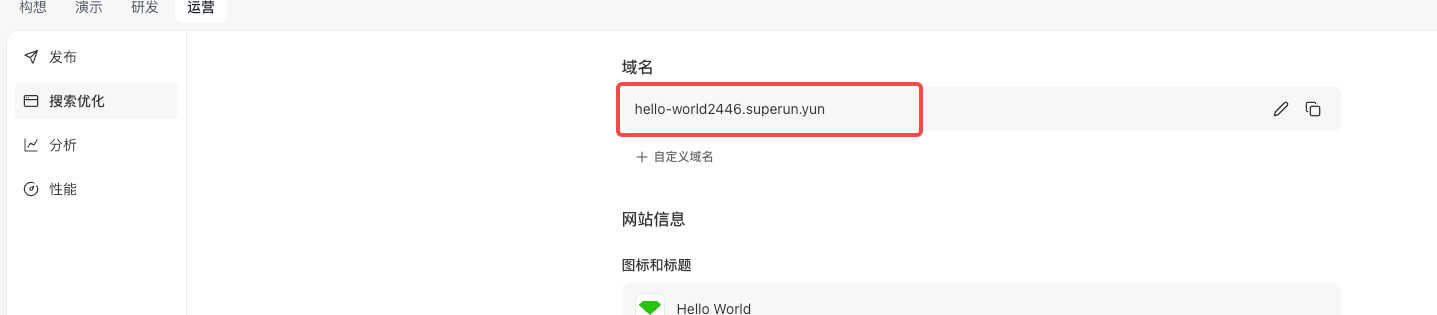
    • 开发域名(点击演示 / 打开新窗口预览获取域名,去掉路径部分)
    • 发布上线之后的正式域名
  3. 添加重定向 URL——在域名后拼接回调页面路径,例如:
    • 域名为 https://hello-world2446.superun.yun,回调路径为 /auth/callback/feishu
    • 则重定向 URL 为 https://hello-world2446.superun.yun/auth/callback/feishu
    安全设置 获取superun开发域名 获取superun发布后的域名

步骤 5:创建版本并发布

  1. 左侧菜单 →「版本管理与发布
  2. 创建版本 → 填写版本号和更新说明
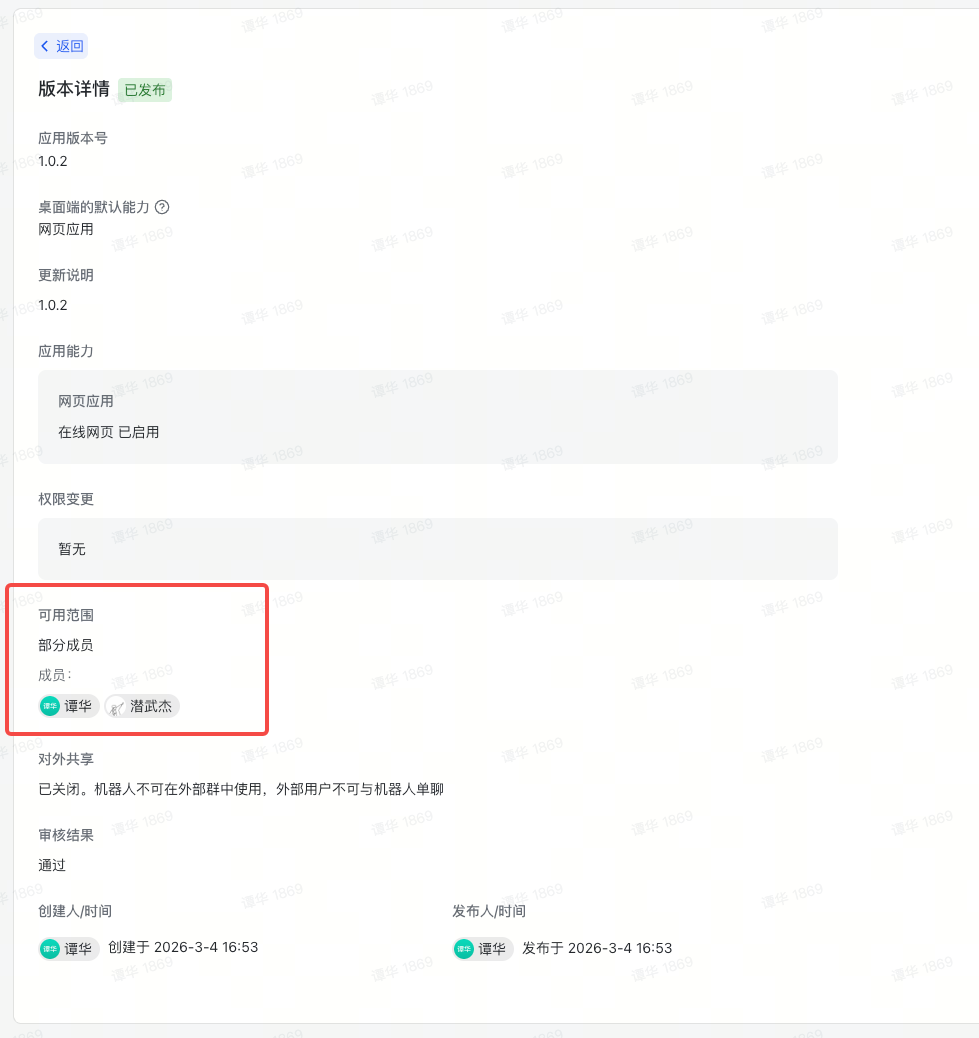
  3. 选择可用范围——全体员工或部分成员(此处限制了哪些用户可以扫码登录)
  4. 提交发布(企业内部应用通常自动通过审核) 设置版本可用范围
💡 提示:权限开通后必须创建版本并发布,权限才会生效。

三、数据流程

用户打开 /login


前端加载飞书 QR SDK(script 标签动态注入)


前端生成 CSRF state 并存入 sessionStorage


调用 Edge Function feishu-qr-url(传入 redirect_uri + state)
→ 后端用 FEISHU_APP_ID 构造 goto URL 返回前端


调用 window.QRLogin({ goto: gotoUrl }) 渲染二维码


用户用飞书 App 扫码确认


SDK 通过 postMessage 返回 tmp_code


前端跳转到 goto + &tmp_code=xxx


飞书服务端验证,302 重定向到 redirect_uri?code=xxx&state=xxx


/auth/callback/feishu 页面提取 code,校验 state


前端调用 Edge Function feishu-auth,传入 code 和 redirect_uri


Edge Function 内部:
  ① POST /authen/v2/oauth/token → 用 code 换 user_access_token
  ② GET  /authen/v1/user_info   → 用 token 获取用户信息(含 tenant_key)
  ③ (可选)校验 tenant_key 是否在白名单中
  ④ 查询/创建 Supabase 用户 + user_identities 记录
  ⑤ 生成 magiclink token_hash 返回前端


前端调用 supabase.auth.verifyOtp({ token_hash, type: 'magiclink' })


Supabase 会话建立,跳转到受保护页面

四、环境变量

  1. plugin_secret_prefix 应为 SUPERUN
变量名位置说明
FEISHU_APP_IDEdge Function Secrets飞书 App ID,用于构造二维码 URL 和令牌交换
FEISHU_APP_SECRETEdge Function Secrets飞书应用密钥,仅后端使用
ALLOWED_TENANT_KEYSEdge Function Secrets(可选)允许登录的企业 tenant_key,逗号分隔;留空则跳过白名单校验,允许所有企业登录

五、关键代码

4.1 飞书 QR SDK 加载 Hook

飞书二维码 SDK 只能通过 script 标签引入。这个 Hook 封装了脚本加载、通过 Edge Function 获取授权 URL、二维码初始化和扫码事件监听。 核心改动appId 不再由前端传入,而是通过 feishu-qr-url Edge Function 在后端构造完整的 goto URL,前端只提供 redirectUristate
// hooks/useFeishuQRCode.ts
import { supabase } from "@/integrations/supabase/client";
const FEISHU_SDK_URL =
  "https://lf-package-cn.feishucdn.com/obj/feishu-static/lark/passport/qrcode/LarkSSOSDKWebQRCode-1.0.3.js";
interface UseFeishuQRCodeOptions {
  containerId: string;   // 二维码渲染容器的 DOM id
  redirectUri: string;    // OAuth 回调地址
  width?: string;
  height?: string;
  style?: string;
}
export function useFeishuQRCode({
  containerId, redirectUri,
  width = "300", height = "300", style,
}: UseFeishuQRCodeOptions) {
  const [status, setStatus] = useState<"loading" | "ready" | "scanned" | "error">("loading");
  const [errorMessage, setErrorMessage] = useState<string | null>(null);
  const qrLoginRef = useRef(null);
  const gotoUrlRef = useRef("");
  // 生成随机 state 存入 sessionStorage,防 CSRF
  const generateState = useCallback(() => {
    const randomState = crypto.randomUUID();
    sessionStorage.setItem("feishu_oauth_state", randomState);
    return randomState;
  }, []);
  useEffect(() => {
    let isCleanedUp = false;
    const loadSdkAndInit = async () => {
      // 1. 动态注入 SDK 脚本
      if (!window.QRLogin) {
        await new Promise<void>((resolve, reject) => {
          const script = document.createElement("script");
          script.src = FEISHU_SDK_URL;
          script.async = true;
          script.onload = () => resolve();
          script.onerror = () => reject(new Error("飞书 SDK 加载失败"));
          document.head.appendChild(script);
        });
      }
      if (isCleanedUp) return;
      // 2. 生成 CSRF state,调用 Edge Function 获取 goto URL
      const state = generateState();
      const { data, error } = await supabase.functions.invoke("feishu-qr-url", {
        body: { redirect_uri: redirectUri, state },
      });
      if (isCleanedUp) return;
      if (error || !data?.goto_url) {
        setStatus("error");
        setErrorMessage("获取登录链接失败");
        return;
      }
      const gotoUrl = data.goto_url;
      gotoUrlRef.current = gotoUrl;
      // 3. 渲染二维码
      const qrLoginInstance = window.QRLogin({
        id: containerId,
        goto: gotoUrl,
        width, height,
      });
      qrLoginRef.current = qrLoginInstance;
      setStatus("ready");
      // 4. 监听扫码事件
      const handleMessage = (event: MessageEvent) => {
        if (
          qrLoginInstance.matchOrigin(event.origin) &&
          qrLoginInstance.matchData(event.data)
        ) {
          setStatus("scanned");
          const tmpCode = event.data.tmp_code;
          // 跳转到飞书授权页,飞书验证后会 302 到 redirect_uri
          window.location.href = `${gotoUrl}&tmp_code=${tmpCode}`;
        }
      };
      window.addEventListener("message", handleMessage);
      return () => window.removeEventListener("message", handleMessage);
    };
    loadSdkAndInit().catch((err) => {
      if (!isCleanedUp) {
        setStatus("error");
        setErrorMessage(err.message);
      }
    });
    return () => { isCleanedUp = true; };
  }, [redirectUri, containerId, width, height, style, generateState]);
  return { status, errorMessage };
}
要点
  • appId 不在前端出现——通过 feishu-qr-url Edge Function 在后端拼接完整 URL
  • state 仍在前端生成并存入 sessionStorage,回调页对比后立即删除
  • matchOrigin + matchData 双重校验确保消息来源合法
  • 如果 Edge Function 调用失败,Hook 会进入 error 状态并显示提示

4.2 OAuth 回调页

飞书 302 重定向回来后,回调页负责提取 code,校验 state,调用后端换取用户信息:
// pages/AuthCallback.tsx
export default function AuthCallback() {
  const [searchParams] = useSearchParams();
  const navigate = useNavigate();
  const hasProcessed = useRef(false); // 防止 StrictMode 双重执行
  useEffect(() => {
    if (hasProcessed.current) return;
    hasProcessed.current = true;
    const processCallback = async () => {
      const code = searchParams.get("code");
      const returnedState = searchParams.get("state");
      // 1. 校验 state(防 CSRF)
      const storedState = sessionStorage.getItem("feishu_oauth_state");
      if (!returnedState || returnedState !== storedState) {
        // 安全校验失败,终止流程
        return;
      }
      sessionStorage.removeItem("feishu_oauth_state");
      if (!code) return; // 授权码缺失
      // 2. 调用后端 Edge Function
      const redirectUri = `${window.location.origin}/auth/callback/feishu`;
      const { data, error } = await supabase.functions.invoke("feishu-auth", {
        body: { code, redirect_uri: redirectUri },
      });
      // 3. 处理结果
      if (data?.error === "access_denied") {
        // 企业不在白名单中
        return;
      }
      if (data?.user) {
        // 登录成功,保存用户信息并跳转
        navigate("/", { replace: true });
      }
    };
    processCallback();
  }, [searchParams, navigate]);
}
要点
  • useRef(hasProcessed) 是必须的——React StrictMode 下 useEffect 会执行两次,第一次执行会清除 sessionStorage 中的 state,第二次执行就会校验失败
  • redirect_uri 必须和登录页 goto 中传的完全一致

4.3 Edge Function:feishu-qr-url(生成二维码授权 URL)

前端不再持有 FEISHU_APP_ID,改由这个轻量 Edge Function 在后端构造完整的 goto URL:
// supabase/functions/feishu-qr-url/index.ts
serve(async (req) => {
  const appId = Deno.env.get("SUPERUN_FEISHU_APP_ID");
  if (!appId) {
    return new Response(
      JSON.stringify({ error: "FEISHU_APP_ID not configured" }),
      { status: 500 }
    );
  }
  const { redirect_uri, state } = await req.json();
  if (!redirect_uri || !state) {
    return new Response(
      JSON.stringify({ error: "redirect_uri and state are required" }),
      { status: 400 }
    );
  }
  const gotoUrl =
    `https://passport.feishu.cn/suite/passport/oauth/authorize` +
    `?client_id=${appId}` +
    `&redirect_uri=${encodeURIComponent(redirect_uri)}` +
    `&response_type=code` +
    `&state=${state}`;
  return new Response(JSON.stringify({ goto_url: gotoUrl }), { status: 200 });
});
配置
[functions.feishu-qr-url]
verify_jwt = false

4.4 Edge Function:feishu-auth(核心后端)

// supabase/functions/feishu-auth/index.ts
serve(async (req) => {
  if (req.method === "OPTIONS") {
    return new Response("ok", { headers: corsHeaders });
  }
  const feishuAppId = Deno.env.get("SUPERUN_FEISHU_APP_ID");
  const feishuAppSecret = Deno.env.get("SUPERUN_FEISHU_APP_SECRET");
  const allowedTenantKeys = Deno.env.get("SUPERUN_FEISHU_ALLOWED_TENANT_KEYS") || "";
  const supabaseUrl = Deno.env.get("SUPABASE_URL")!;
  const supabaseServiceRoleKey = Deno.env.get("SUPABASE_SERVICE_ROLE_KEY")!;
  if (!feishuAppId || !feishuAppSecret) {
    logStep("ERROR", { message: "Missing FEISHU_APP_ID or FEISHU_APP_SECRET" });
    return new Response(
      JSON.stringify({ error: "Server configuration error" }),
      { headers: { ...corsHeaders, "Content-Type": "application/json" }, status: 500 }
    );
  }
  // Supabase Admin client (bypasses RLS)
  const supabaseAdmin = createClient(supabaseUrl, supabaseServiceRoleKey, {
    auth: { autoRefreshToken: false, persistSession: false },
  });
  const { code, redirect_uri } = await req.json();
  if (!code) {
    return new Response(
      JSON.stringify({ error: "Authorization code is required" }),
      { headers: { ...corsHeaders, "Content-Type": "application/json" }, status: 400 }
    );
  }
  // ── Step 1: Exchange code for user_access_token (Feishu v2 API) ──
  logStep("Step 1: Exchanging code for user_access_token");
  const tokenResponse = await fetch(
    "https://open.feishu.cn/open-apis/authen/v2/oauth/token",
    {
      method: "POST",
      headers: { "Content-Type": "application/json; charset=utf-8" },
      body: JSON.stringify({
        grant_type: "authorization_code",
        client_id: feishuAppId,
        client_secret: feishuAppSecret,
        code,
        redirect_uri,
      }),
    }
  );
  const tokenData = await tokenResponse.json();
  if (tokenData.code !== 0 || !tokenData.access_token) {
    logStep("ERROR: Token exchange failed", {
      code: tokenData.code,
      error: tokenData.error,
      description: tokenData.error_description,
    });
    return new Response(
      JSON.stringify({
        error: "Token exchange failed",
        detail: tokenData.error_description || tokenData.error || "Unknown error",
      }),
      { headers: { ...corsHeaders, "Content-Type": "application/json" }, status: 401 }
    );
  }
  logStep("Step 1 completed", { expires_in: tokenData.expires_in });
  // ── Step 2: Get user info from Feishu ──
  logStep("Step 2: Fetching user info");
  const userInfoResponse = await fetch(
    "https://open.feishu.cn/open-apis/authen/v1/user_info",
    {
      method: "GET",
      headers: {
        Authorization: `Bearer ${tokenData.access_token}`,
        "Content-Type": "application/json; charset=utf-8",
      },
    }
  );
  const userInfoData = await userInfoResponse.json();
  if (userInfoData.code !== 0) {
    logStep("ERROR: Failed to fetch user info", { code: userInfoData.code, msg: userInfoData.msg });
    return new Response(
      JSON.stringify({ error: "Failed to get user info", detail: userInfoData.msg }),
      { headers: { ...corsHeaders, "Content-Type": "application/json" }, status: 401 }
    );
  }
  const feishuUser = userInfoData.data;
  const tenantKey = feishuUser.tenant_key;
  logStep("Step 2 completed", {
    name: feishuUser.name,
    tenant_key: tenantKey,
    open_id: feishuUser.open_id,
  });
  // ── Step 3: Enterprise whitelist validation (optional) ──
  // 如果 SUPERUN_FEISHU_ALLOWED_TENANT_KEYS 未配置或为空,则跳过白名单校验,允许所有企业登录
  logStep("Step 3: Validating tenant_key (optional)");
  const allowedList = allowedTenantKeys
    .split(",")
    .map((key: string) => key.trim())
    .filter(Boolean);
  if (allowedList.length > 0 && !allowedList.includes(tenantKey)) {
    logStep("REJECTED: Tenant not in whitelist", {
      tenant_key: tenantKey,
      allowed: allowedList,
    });
    return new Response(
      JSON.stringify({
        error: "access_denied",
        message: "您的企业未被授权访问此应用",
        tenant_key: tenantKey,
      }),
      { headers: { ...corsHeaders, "Content-Type": "application/json" }, status: 403 }
    );
  }
  logStep("Step 3 completed: Tenant validated (or whitelist disabled)");
  // 遵循第三方 OAuth 通用架构
  // ── Step 4: Find or create Supabase user via user_identities table ──
  logStep("Step 4: Finding or creating Supabase user");
  const oauthProvider = "feishu";
  const oauthOpenId = feishuUser.open_id;
  // 固定使用虚拟邮箱,避免与用户用真实邮箱注册的账号冲突
  const userEmail = `feishu_${oauthOpenId}@oauth.local`;
  const userMetadata = {
    oauth_provider: oauthProvider,
    oauth_open_id: oauthOpenId,
    name: feishuUser.name,
    en_name: feishuUser.en_name,
    avatar_url: feishuUser.avatar_url,
    tenant_key: tenantKey,
    ...feishuUser,
  };
  // Query user_identities table (service_role bypasses RLS)
  const { data: existingIdentity } = await supabaseAdmin
    .from("user_identities")
    .select("id")
    .eq("oauth_provider", oauthProvider)
    .eq("oauth_open_id", oauthOpenId)
    .single();
  if (existingIdentity) {
    logStep("User exists, updating metadata", { userId: existingIdentity.id });
    // Update auth user metadata
    await supabaseAdmin.auth.admin.updateUserById(existingIdentity.id, {
      user_metadata: userMetadata,
    });
    // Sync user_identities table
    await supabaseAdmin
      .from("user_identities")
      .update({
        raw_metadata: userMetadata,
        updated_at: new Date().toISOString(),
      })
      .eq("id", existingIdentity.id);
  } else {
    logStep("New user, creating Supabase account", { email: userEmail });
    const { error: createError } = await supabaseAdmin.auth.admin.createUser({
      email: userEmail,
      email_confirm: true,
      user_metadata: userMetadata,
    });
    if (createError) {
      logStep("ERROR: Failed to create user", { message: createError.message });
      return new Response(
        JSON.stringify({ error: "Failed to create user account", detail: createError.message }),
        { headers: { ...corsHeaders, "Content-Type": "application/json" }, status: 500 }
      );
    }
    // Trigger automatically creates user_identities row
  }
  // ── Step 5: Generate magic link token for session establishment ──
  logStep("Step 5: Generating magic link token");
  const { data: linkData, error: linkError } = await supabaseAdmin.auth.admin.generateLink({
    type: "magiclink",
    email: userEmail,
  });
  if (linkError || !linkData) {
    logStep("ERROR: Failed to generate link", { message: linkError?.message });
    return new Response(
      JSON.stringify({ error: "Failed to generate session token", detail: linkError?.message }),
      { headers: { ...corsHeaders, "Content-Type": "application/json" }, status: 500 }
    );
  }
  const hashedToken = linkData.properties?.hashed_token;
  if (!hashedToken) {
    logStep("ERROR: No hashed_token in response", { linkData });
    return new Response(
      JSON.stringify({ error: "Failed to generate session token" }),
      { headers: { ...corsHeaders, "Content-Type": "application/json" }, status: 500 }
    );
  }
  logStep("Step 5 completed: Token generated");
  return new Response(
    JSON.stringify({
      token_hash: hashedToken,
      user: feishuUser,
    }),
    {
      headers: { ...corsHeaders, "Content-Type": "application/json" },
      status: 200,
    }
  );
});

注意supabase/config.toml 中需要关闭 JWT 验证,因为这个接口在用户登录前调用:
[functions.feishu-auth]
verify_jwt = false

4.5 Edge Function:feishu-tenant-info(获取企业 tenant_key)

用于在不需要用户扫码的情况下,直接通过应用凭证查询企业信息(获取 tenant_key),拿到后配置到白名单环境变量中:
// supabase/functions/feishu-tenant-info/index.ts
serve(async (req) => {
  const appId = Deno.env.get("FEISHU_APP_ID");
  const appSecret = Deno.env.get("FEISHU_APP_SECRET");
  // Step 1: 获取 tenant_access_token
  const tokenResponse = await fetch(
    "https://open.feishu.cn/open-apis/auth/v3/tenant_access_token/internal",
    {
      method: "POST",
      headers: { "Content-Type": "application/json; charset=utf-8" },
      body: JSON.stringify({ app_id: appId, app_secret: appSecret }),
    }
  );
  const tokenData = await tokenResponse.json();
  // tokenData.tenant_access_token
  // Step 2: 查询企业信息
  const tenantResponse = await fetch(
    "https://open.feishu.cn/open-apis/tenant/v2/tenant/query",
    {
      method: "GET",
      headers: {
        Authorization: `Bearer ${tokenData.tenant_access_token}`,
        "Content-Type": "application/json; charset=utf-8",
      },
    }
  );
  const tenantData = await tenantResponse.json();
  // tenantData.data.tenant 包含 name, tenant_key, display_id 等
  return new Response(JSON.stringify(tenantData.data));
});

六、踩坑记录

问题原因解决方案
State 校验失败(值明明一致)React StrictMode 下 useEffect 执行两次,第一次清除了 sessionStorage,第二次读到 nulluseRef 标记确保回调只处理一次
redirect_uri 不匹配goto 中的、传给令牌接口的、飞书后台配置的三处必须完全一致统一用 window.location.origin + '/auth/callback/feishu' 生成
二维码无法正常加载或扫码后无响应飞书 QR SDK 不支持在 iframe 中运行(跨域限制 & postMessage 来源校验)测试时需点击「打开新窗口」预览,或发布上线后在独立页面中测试