> ## Documentation Index
> Fetch the complete documentation index at: https://docs.superun.ai/llms.txt
> Use this file to discover all available pages before exploring further.
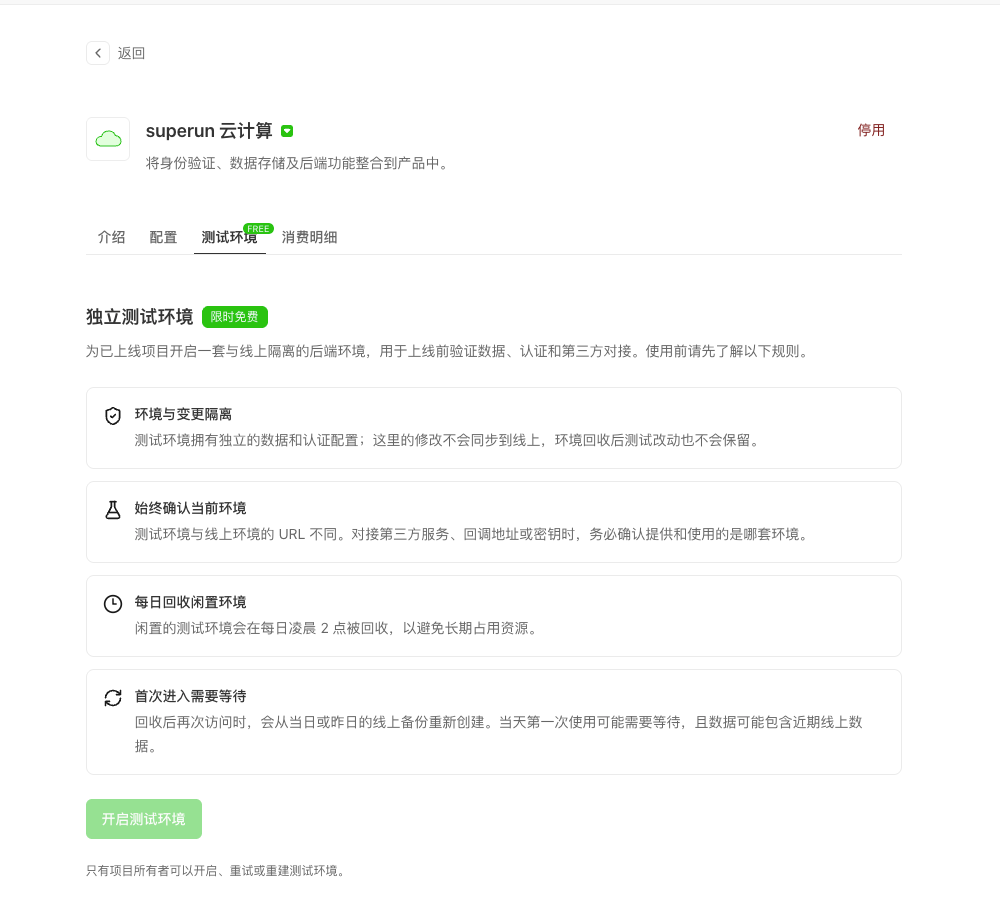
# Independent test environment
> For published projects, open a backend isolated from production to verify data, auth, and third-party integrations (limited-time free; as shown in product).
## What it is
In one sentence: for a project that is **already live**, open a separate backend for practice and safe trial-and-error.
It is isolated from the production environment your users rely on—mistakes here usually do not affect production.
Think of it as:
* **Production** = the store open for customers
* **Test environment** = the back kitchen / tasting room
What you try in the tasting room does not automatically become what customers get.
 ***
## What problems it solves
After go-live you may still want to:
* Try a new login flow without breaking production
* Change the database schema before touching live data
* Validate WeChat / payment / third-party callbacks on a **test URL** first
Trying those on production can hit real users. The independent test environment is for **post-publish verification**.
***
## Where to find it
1. Open your project.
2. Go to **Build → Skill Library → superun Cloud**.
3. Open the **Test environment** tab (may show a **FREE / limited-time free** badge).
This tab is mainly shown on the China site (as available in product). The project must be **published** and use **superun Cloud**; projects that only connect a self-hosted Supabase do not show this entry.
***
## Who can use it
| Role | Permissions |
| --------------- | ----------------------------------- |
| Project owner | Enable, retry, rebuild |
| Owner + editors | View test environment configuration |
| Others | Do not see this entry |
A confirmation dialog appears before enable—read the rules first. The confirm button may include a short countdown to prevent mis-clicks.
***
## How it differs from production
### 1. Isolation
The test environment has its own:
* URL
* Database data
* Auth configuration
Changes here **do not sync to production**. After recycle, test-side changes are not kept.
### 2. Where data comes from
Test data usually comes from a **recent production backup** (first enable, or after daily recycle, often from today’s / yesterday’s backup).
So:
* Treat it as potentially sensitive near-real data
* Never give test URLs / keys to partners as production config
### 3. Idle recycle
Idle test environments are recycled **daily at 02:00** to free resources. If the project is still actively in use at that time, the system may keep the test environment. After recycle, re-entry restores from a recent production backup; cloud tools and the test build are unavailable during restore, and prior test changes may be lost.
### 4. First wait
First enable—or re-entry after recycle—needs provisioning time. The UI shows progress (e.g. allocate resources → restore from backup → publish test service). Keep the page open and wait.
***
## After it is ready
* A banner reminds you this is the **test** environment—URL / data / auth are not production
* You can manage this backend much like Cloud configuration
* Owners can **Rebuild test environment**
***
## What rebuild means
**Rebuild** deletes the current test environment and recreates one from the latest production backup.
Notes:
* Tables, auth config, and other test changes are **permanently lost**
* **Production is not affected**
* The test environment is unavailable during rebuild
Use when the test env is messy and you want a clean copy from production.
***
## Pricing
The product marks it **limited-time free** (often a **FREE** badge). Whether it stays free long-term follows the latest in-product copy.
***
## How to use it
**Good for:**
* Verifying login, database, and APIs after publish
* Validating third-party **test** callbacks before production
* Bold experiments without touching live user data
**Must:**
* Check whether you are on test or production (different URLs)
* Never hand test URLs / keys to partners as production config
* Finish important checks the same day—recycle may run at 02:00
* Only owners can enable; ask the owner if you need it
* After each restore or rebuild, re-verify auth, Edge Functions, webhooks, and third-party callbacks
* Do not keep the only copy of important data or config only in the test environment
**Not for:**
* Using the test env as long-term production
* Expecting test data to sync to production
* Enabling before the project is published
***
## Three steps
1. **Publish** the project first.
2. As owner, open **Cloud → Test environment**, click **Open test environment**, confirm the rules.
3. When ready, verify with test config; if messy, **rebuild**.
To ship verified changes to production, still use **Operate → Publish**. Table data, users, or config changed directly in the test environment do not go live automatically.
***
## One-liner
Test environment = an isolated back kitchen for a live project: safe to experiment, separate from the storefront, recycled on a schedule, and often seeded from a production backup.
***
## FAQ
Confirm the project is published, uses superun Cloud, you are on the China site, and you are the project owner. Self-hosted Supabase-only projects do not show the entry. Editors can view but cannot enable, retry, or rebuild.
No. The project must be published first.
No. Environments are isolated; recycle/rebuild also does not push test changes to production.
Database creation, config restore, Edge Functions, and the test build finish asynchronously. Keep the page open until Ready. On explicit failure, the owner can retry; if it sticks on one stage for a long time, contact support with the project ID and current stage.
Re-enter to restore from a recent production backup, or have the owner re-enable; prior test-only changes may be gone.
No. Rebuild only deletes and recreates the test environment; production keeps running, but current test data and config are permanently discarded.
Use the test environment URL for validation and the production URL for live traffic. They differ—update callbacks, webhooks, allowlists, and credentials when you switch.
No. Only the owner can enable, retry, or rebuild; editors can view configuration.
## Related docs
* [superun Cloud](/superun/integrations/cloud)
* [Publish](/superun/features/publish)
***
## What problems it solves
After go-live you may still want to:
* Try a new login flow without breaking production
* Change the database schema before touching live data
* Validate WeChat / payment / third-party callbacks on a **test URL** first
Trying those on production can hit real users. The independent test environment is for **post-publish verification**.
***
## Where to find it
1. Open your project.
2. Go to **Build → Skill Library → superun Cloud**.
3. Open the **Test environment** tab (may show a **FREE / limited-time free** badge).
This tab is mainly shown on the China site (as available in product). The project must be **published** and use **superun Cloud**; projects that only connect a self-hosted Supabase do not show this entry.
***
## Who can use it
| Role | Permissions |
| --------------- | ----------------------------------- |
| Project owner | Enable, retry, rebuild |
| Owner + editors | View test environment configuration |
| Others | Do not see this entry |
A confirmation dialog appears before enable—read the rules first. The confirm button may include a short countdown to prevent mis-clicks.
***
## How it differs from production
### 1. Isolation
The test environment has its own:
* URL
* Database data
* Auth configuration
Changes here **do not sync to production**. After recycle, test-side changes are not kept.
### 2. Where data comes from
Test data usually comes from a **recent production backup** (first enable, or after daily recycle, often from today’s / yesterday’s backup).
So:
* Treat it as potentially sensitive near-real data
* Never give test URLs / keys to partners as production config
### 3. Idle recycle
Idle test environments are recycled **daily at 02:00** to free resources. If the project is still actively in use at that time, the system may keep the test environment. After recycle, re-entry restores from a recent production backup; cloud tools and the test build are unavailable during restore, and prior test changes may be lost.
### 4. First wait
First enable—or re-entry after recycle—needs provisioning time. The UI shows progress (e.g. allocate resources → restore from backup → publish test service). Keep the page open and wait.
***
## After it is ready
* A banner reminds you this is the **test** environment—URL / data / auth are not production
* You can manage this backend much like Cloud configuration
* Owners can **Rebuild test environment**
***
## What rebuild means
**Rebuild** deletes the current test environment and recreates one from the latest production backup.
Notes:
* Tables, auth config, and other test changes are **permanently lost**
* **Production is not affected**
* The test environment is unavailable during rebuild
Use when the test env is messy and you want a clean copy from production.
***
## Pricing
The product marks it **limited-time free** (often a **FREE** badge). Whether it stays free long-term follows the latest in-product copy.
***
## How to use it
**Good for:**
* Verifying login, database, and APIs after publish
* Validating third-party **test** callbacks before production
* Bold experiments without touching live user data
**Must:**
* Check whether you are on test or production (different URLs)
* Never hand test URLs / keys to partners as production config
* Finish important checks the same day—recycle may run at 02:00
* Only owners can enable; ask the owner if you need it
* After each restore or rebuild, re-verify auth, Edge Functions, webhooks, and third-party callbacks
* Do not keep the only copy of important data or config only in the test environment
**Not for:**
* Using the test env as long-term production
* Expecting test data to sync to production
* Enabling before the project is published
***
## Three steps
1. **Publish** the project first.
2. As owner, open **Cloud → Test environment**, click **Open test environment**, confirm the rules.
3. When ready, verify with test config; if messy, **rebuild**.
To ship verified changes to production, still use **Operate → Publish**. Table data, users, or config changed directly in the test environment do not go live automatically.
***
## One-liner
Test environment = an isolated back kitchen for a live project: safe to experiment, separate from the storefront, recycled on a schedule, and often seeded from a production backup.
***
## FAQ
Confirm the project is published, uses superun Cloud, you are on the China site, and you are the project owner. Self-hosted Supabase-only projects do not show the entry. Editors can view but cannot enable, retry, or rebuild.
No. The project must be published first.
No. Environments are isolated; recycle/rebuild also does not push test changes to production.
Database creation, config restore, Edge Functions, and the test build finish asynchronously. Keep the page open until Ready. On explicit failure, the owner can retry; if it sticks on one stage for a long time, contact support with the project ID and current stage.
Re-enter to restore from a recent production backup, or have the owner re-enable; prior test-only changes may be gone.
No. Rebuild only deletes and recreates the test environment; production keeps running, but current test data and config are permanently discarded.
Use the test environment URL for validation and the production URL for live traffic. They differ—update callbacks, webhooks, allowlists, and credentials when you switch.
No. Only the owner can enable, retry, or rebuild; editors can view configuration.
## Related docs
* [superun Cloud](/superun/integrations/cloud)
* [Publish](/superun/features/publish)