> ## Documentation Index
> Fetch the complete documentation index at: https://docs.superun.ai/llms.txt
> Use this file to discover all available pages before exploring further.
# Project ownership & collaborator billing
> Adjust whether a project belongs to your personal or team space on Home, and choose who pays when collaborators edit.
superun supports two project settings related to collaboration and billing: **adjusting project ownership** (personal / team), and choosing **who pays** when collaborators edit.
***
## 1. Adjust project ownership (personal / team)
### When to use
* Move a project from your personal space to a team, or back from team to personal
### Steps
1. Open **My Projects** on the superun Home page (or the project list in the corresponding workspace).
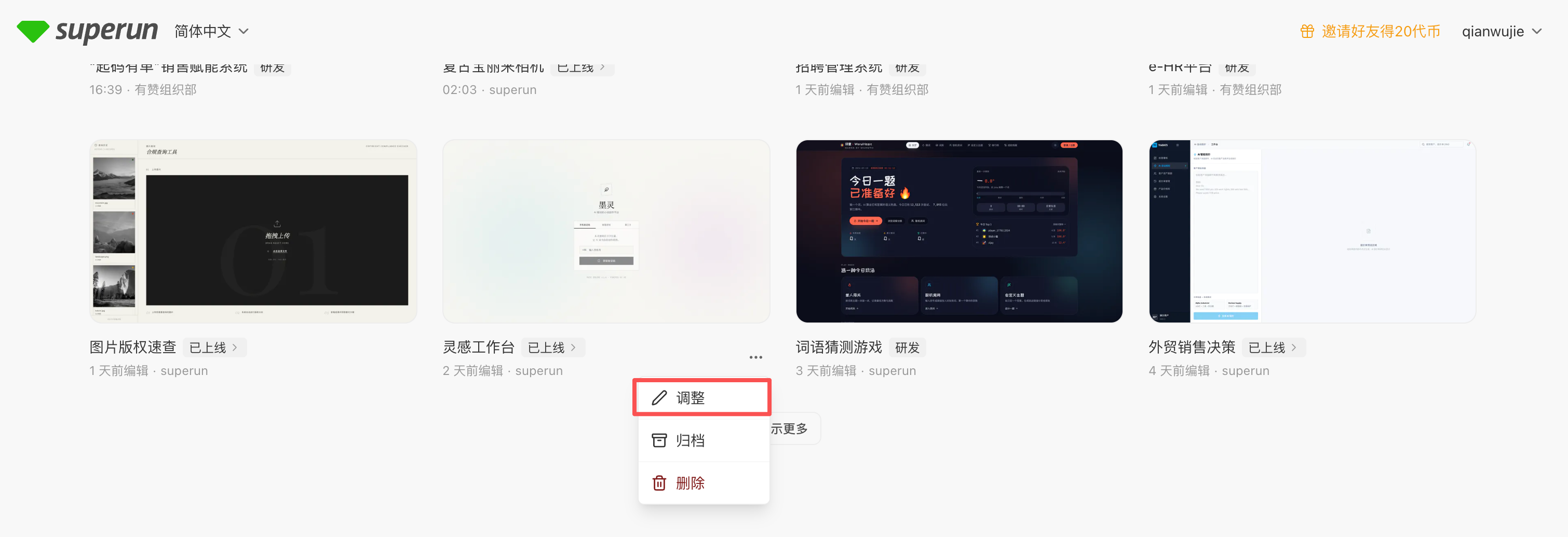
2. On the project card, tap **…** at the **bottom-right** → **Adjust**.
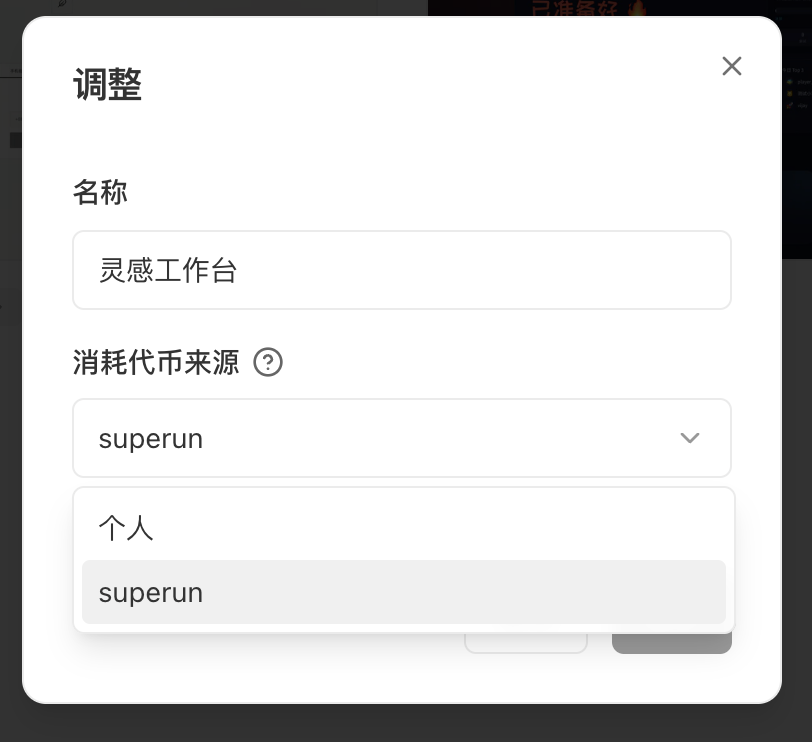
 3. In the dialog, choose **Personal** or **Team** (shown as **Source of token consumption** in the UI).
4. Confirm and save.
3. In the dialog, choose **Personal** or **Team** (shown as **Source of token consumption** in the UI).
4. Confirm and save.
 ### Notes
* After the change, the project belongs to the selected space; usage is deducted from the matching personal or team balance.
* Project cards on Home show an ownership label so personal and team projects are easy to tell apart.
* To **bulk-migrate** many projects, use [Team management → Data migration](/superun/detailed-tips-modules/team-management-guide#数据迁移).
Usually only the project **owner** can do this.
***
## 2. Collaborator billing
### When to use
* The project already has collaborators, and you need to decide who pays when they **edit**
### Steps
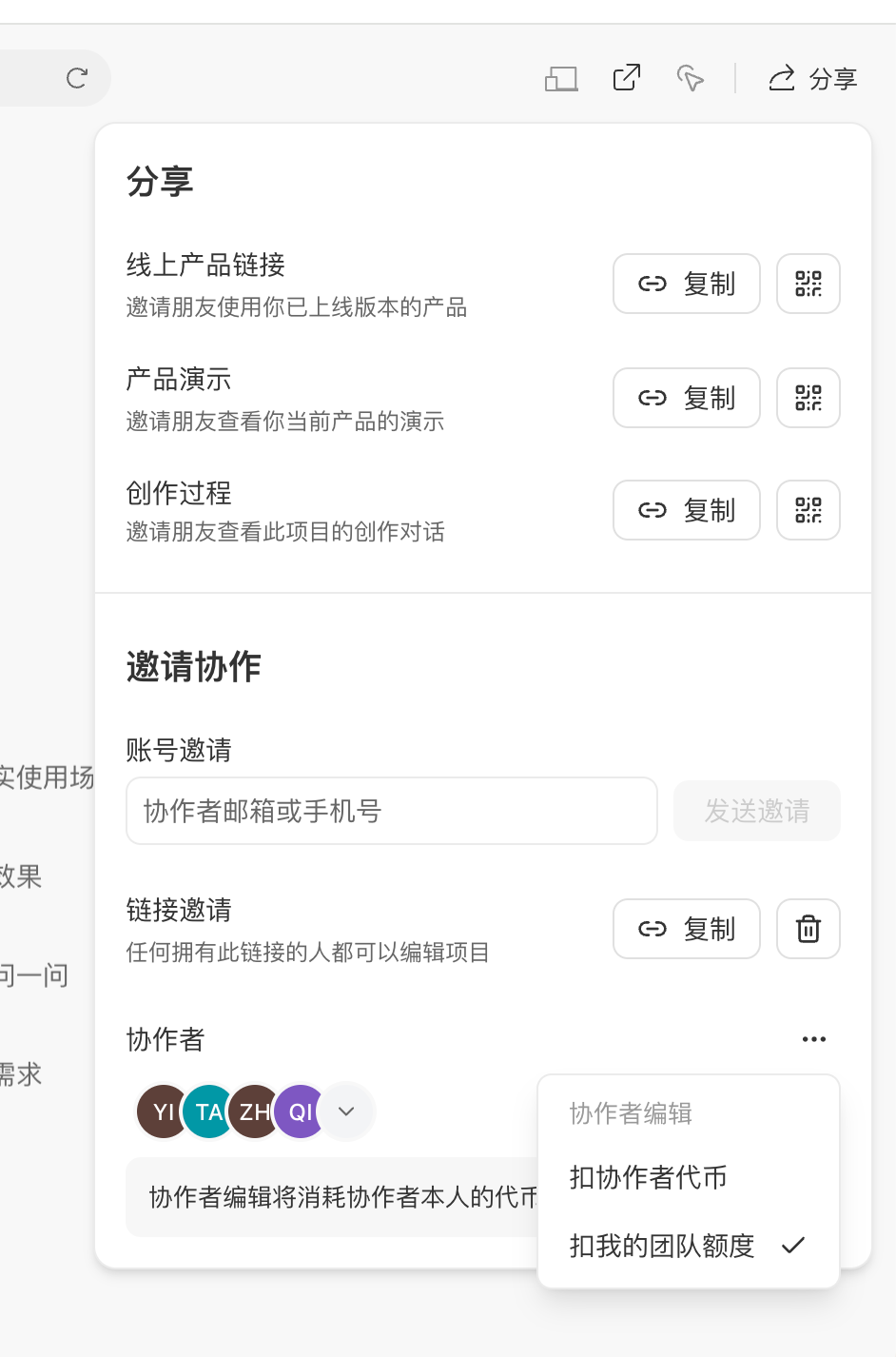
1. Open the project and click **Share**.
2. Under **Invite collaborators**, find **…** next to **Collaborators**.
3. Choose a billing mode (options depend on project ownership):
* **Personal project**: **Deduct collaborator tokens** or **Deduct my tokens**
* **Team project**: **Deduct collaborator tokens** or **Deduct my team quota**
### Notes
* After the change, the project belongs to the selected space; usage is deducted from the matching personal or team balance.
* Project cards on Home show an ownership label so personal and team projects are easy to tell apart.
* To **bulk-migrate** many projects, use [Team management → Data migration](/superun/detailed-tips-modules/team-management-guide#数据迁移).
Usually only the project **owner** can do this.
***
## 2. Collaborator billing
### When to use
* The project already has collaborators, and you need to decide who pays when they **edit**
### Steps
1. Open the project and click **Share**.
2. Under **Invite collaborators**, find **…** next to **Collaborators**.
3. Choose a billing mode (options depend on project ownership):
* **Personal project**: **Deduct collaborator tokens** or **Deduct my tokens**
* **Team project**: **Deduct collaborator tokens** or **Deduct my team quota**
 ### Options by ownership
| Ownership | Options in the Share panel |
| -------------------- | ----------------------------------------------------------------------------------------------- |
| **Personal project** | **Deduct collaborator tokens** / **Deduct my tokens** (charged to the owner’s personal balance) |
| **Team project** | **Deduct collaborator tokens** / **Deduct my team quota** (charged to the owner’s team quota) |
Footer copy in the panel follows the live product. For personal projects using **Deduct my tokens**, keep enough personal balance; for team projects using **Deduct my team quota**, top up team quota if needed — see [Team management](/superun/detailed-tips-modules/team-management-guide).
***
## FAQ
**Ownership** decides whether the project lives in personal or team space. **Collaborator billing** decides whether edit usage comes from collaborators’ accounts or from the **owner** (personal projects: **my tokens**; team projects: **team quota**). They are independent — set each as needed.
No. For **personal** projects, the Share panel offers **Deduct collaborator tokens** and **Deduct my tokens**. **Deduct my team quota** appears only for **team** projects.
### Options by ownership
| Ownership | Options in the Share panel |
| -------------------- | ----------------------------------------------------------------------------------------------- |
| **Personal project** | **Deduct collaborator tokens** / **Deduct my tokens** (charged to the owner’s personal balance) |
| **Team project** | **Deduct collaborator tokens** / **Deduct my team quota** (charged to the owner’s team quota) |
Footer copy in the panel follows the live product. For personal projects using **Deduct my tokens**, keep enough personal balance; for team projects using **Deduct my team quota**, top up team quota if needed — see [Team management](/superun/detailed-tips-modules/team-management-guide).
***
## FAQ
**Ownership** decides whether the project lives in personal or team space. **Collaborator billing** decides whether edit usage comes from collaborators’ accounts or from the **owner** (personal projects: **my tokens**; team projects: **team quota**). They are independent — set each as needed.
No. For **personal** projects, the Share panel offers **Deduct collaborator tokens** and **Deduct my tokens**. **Deduct my team quota** appears only for **team** projects.